Footer summaries
The footer band of a table view shows how many rows the table lists. footer words that count, adds a hint, figures the server computes over the listed rows — a total, a count of failures — and a legend of a select column's colors.
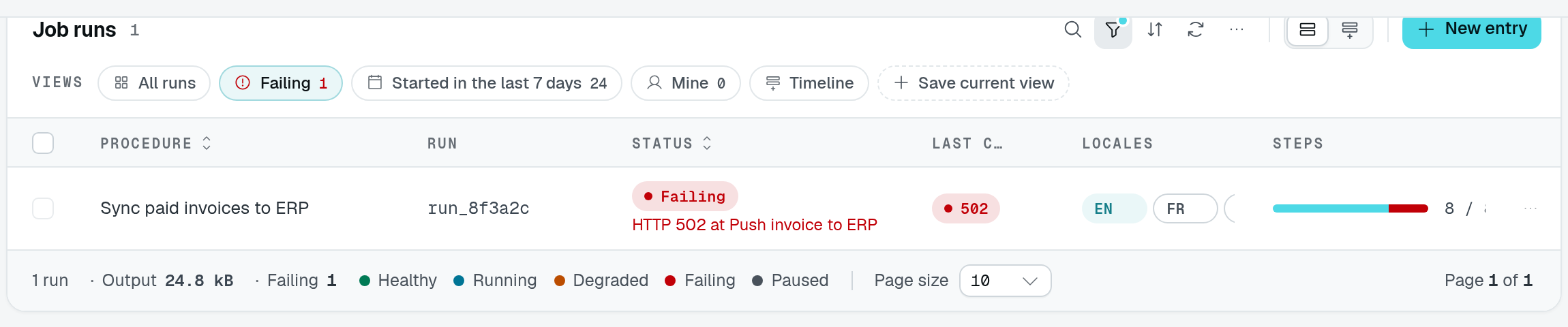
The playground's Failing view narrows the dataset to one run. Its footer shows that run's output, the failure count and the status legend. Compare the unfiltered paginated view, whose footer covers all 32 runs even while only ten are displayed.
static subscriptions = TableView(subscriptionDataAPI, {
  caption: "Subscriptions",
  footer: {
    countLabel: "$billing.subscriptions.count", // "{count} subscriptions"
    summary: [
      { label: "MRR", field: "mrr", op: "sum" },
      { label: "Past due", op: "count", where: { field: "status", equals: "past_due" } },
    ],
    legend: "status",
  },
});
Options
TableViewFooterOptions:
| Option | Type | Purpose |
|---|---|---|
countLabel | string | Row count text: an i18n key ($) receiving { count }, pluralized on it. Defaults to "{count} items". |
hint | string | A hint right of the count ($: i18n key). |
summary | TableViewFooterSummary[] | Figures next to the count (below). |
legend | string | A SelectType column whose items, with their colors, the footer lists. Registration throws for another column. |
A summary, TableViewFooterSummary:
| Field | Type | Purpose |
|---|---|---|
label | string | Shown before the figure ($: i18n key). |
op | "sum" | "count" | Sum a column, or count rows. |
field | string | The column summed; required by sum. |
where | RowActionRule | Only the rows this rule accepts are summed or counted. The row action rule grammar: equals, notEquals, in, notIn, combined with and, or, not. |
format | TableViewSummaryFormat | Intl.NumberFormat options: style (decimal, percent, currency), currency, notation (standard, compact), minimumFractionDigits, maximumFractionDigits. |
Without format, a sum reads like its column's cells (a price as a price) and a count as a whole number. Registration throws for a sum without field, and for a field or a where naming an unknown column.
How the figures are computed
The figures cover every row the table lists — its filters, search and tab — not only the page on screen. The server computes them in the database: where reads the stored fields of a row, and it never leaves the server (the client only knows a summary by an id).
They are served by the controller's summary route, GET <location>/summary?ids=<id>, which computes only the summaries a table view declared, with the caller's list permission. TableViewRoutes.All includes it; a controller listing its routes one by one mounts it itself:
DataController(
  Subscription,
  {
    get: TableViewRoutes.Get,
    list: TableViewRoutes.List,
    countBatch: TableViewRoutes.CountBatch,
    summary: TableViewRoutes.Summary,
  },
  Controller("/api/subscriptions"),
)
A table view declaring summaries over a controller that mounts no GET summary route logs a warning at registration, and its figures do not show.
A TableView.fromSource table takes countLabel, hint and legend, but no summary: there is no data controller to compute it.