Confirmations
Every action can ask before it runs, with one option of one type: confirm. It is the same on a built-in row action (delete, archive, edit…), a custom row action, a table's toolbar button and a page's header button, whatever the target — an API call, a drawer, a page, an export, a quick action.
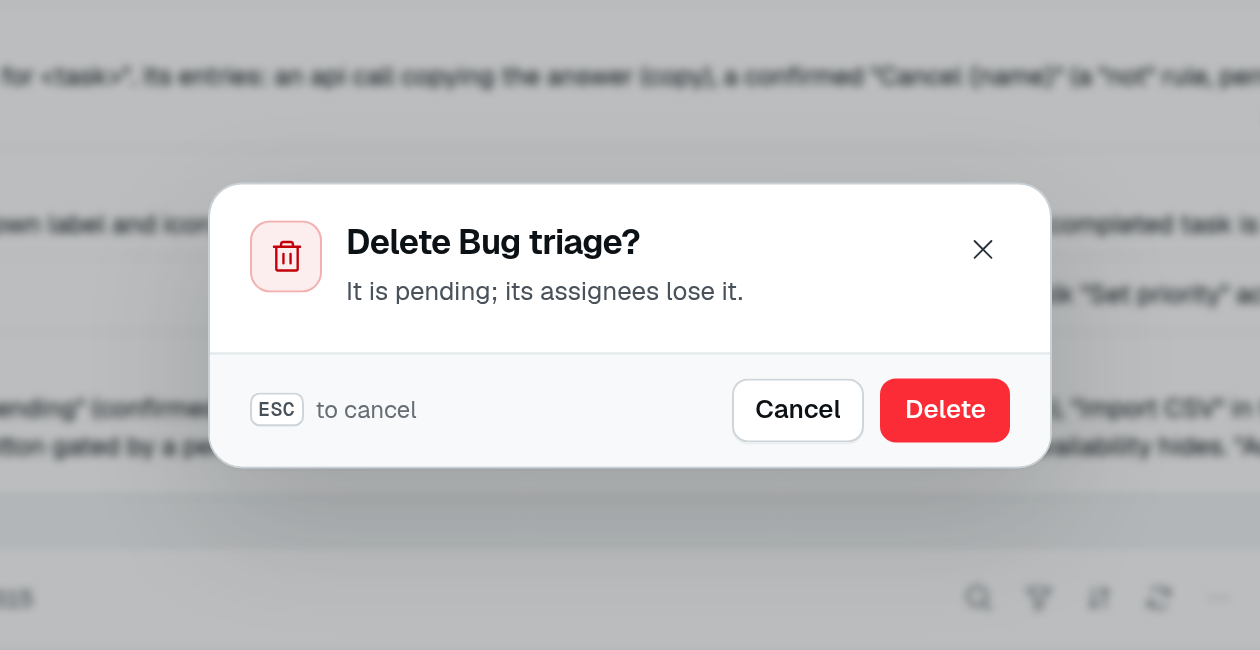
The playground's Custom Row Actions page asks the server for the selected task's confirmation. The task name appears in the title; this capture leaves the deletion unconfirmed.
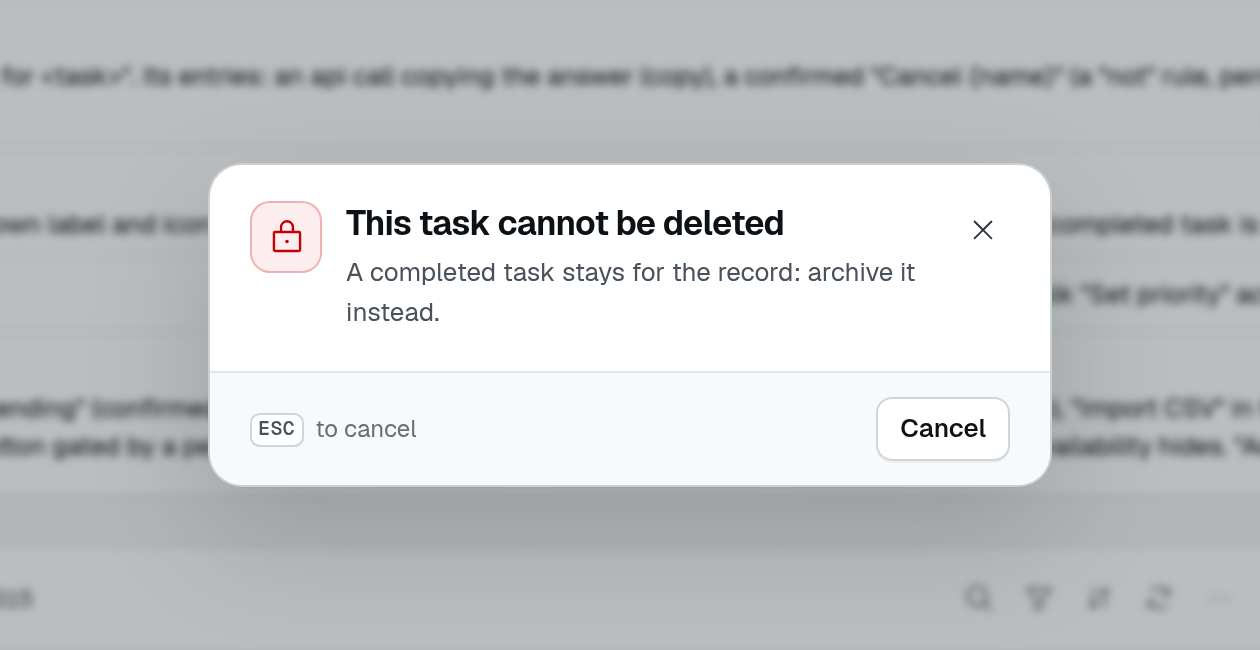
After that same task is marked complete, the server returns This task cannot be deleted. The dialog explains why and offers only Cancel: it is not an enabled Delete button with different wording.
rowActions: {
  delete: { isEnabled: true, confirm: { from: "/api/orders/{{row._id}}/delete-confirm" } },
  custom: [
    {
      label: "Refund",
      icon: "i-ph-arrow-u-up-left",
      target: { type: "api", url: "/api/orders/{{row._id}}/refund", body: { notify: true }, successMessage: "Refunded" },
      confirm: {
        title: "$orders.refund_title", // "Refund {number}?"
        color: "warning",
        fields: [{ id: "reason", label: "Reason", type: new DefaultDataTypes.StringType(), required: true }],
      },
    },
  ],
},
confirm takes either a fixed ConfirmDialog, or { from }, a URL answering the dialog the server words for the row.
ConfirmDialog
| Field | Type | Purpose |
|---|---|---|
title | string | Title of the dialog. Required. |
description | string | Text under the title. |
params | Record<string, unknown> | Values the texts are interpolated with, besides the row's fields. A numeric count pluralizes an i18n key. |
icon | string | Header icon. |
color | ButtonColor | Color of the confirm button and the header icon well: neutral, primary, secondary, success, warning, error, info. |
confirmLabel | string | Text of the confirm button. |
cancelLabel | string | Text of the cancel button. |
impact | ConfirmDialogImpact[] | What the action takes with it, listed above the buttons: { icon, label, count? }. |
secondaryAction | ConfirmDialogSecondaryAction | A button next to cancel and confirm that leaves the dialog open: a link, or a file to download first (below). |
blocked | boolean | The action cannot run (the last owner, a locked row): the dialog only explains why, with a close button. |
confirmText | string | Text the user must type to confirm. |
confirmTextCaseInsensitive | boolean | Compare the typed text with confirmText ignoring case (acme corp confirms Acme Corp). |
fields | FormField[] | Fields the user fills in before confirming; their values go with the request (below). |
component | Component | Escape hatch: a frontend component drawn in the dialog's body, resolved by name from the global registry. |
Texts are i18n keys ($) or literals. Both receive the row's fields and params on a row action ("Remove {name}?"), and { count } on a bulk action: a key's translation as parameters, a literal by its {name} placeholders (a placeholder with no value stays as written).
Dialogs the server words: { from }
A fixed dialog says the same thing for every row. When the answer depends on the row — how many members still hold a role, or why the last owner cannot leave — give confirm: { from: url }. The client reads that URL when the action is pressed and shows the dialog it answers. The URL is filled in with the row's fields ({{row._id}}), and {{row.id}} with the row's id (read through the table's rowIdKey), on a built-in action as on a custom one.
The route answers a ConfirmDialogSerialized, which serializeConfirmDialog(dialog) builds from a ConfirmDialog (it serializes the fields and the component):
import { serializeConfirmDialog, type ConfirmDialogSerialized } from "@antelopejs/interface-dms/base/table-view";
import { AuthUserWithPermission } from "@antelopejs/interface-dms/guards";

const deleteAction = membersTable.getAction("delete")!; // the table's own delete permission

@Get("/:id/removal-confirm")
async removalConfirm(
  @Parameter("id", "param") memberId: string,
  @AuthUserWithPermission(deleteAction) _user: User,
): Promise<ConfirmDialogSerialized> {
  const member = await this.loadMember(memberId);
  if (member.isLastOwner) {
    return serializeConfirmDialog({
      title: "$members.last_owner_title",
      icon: "i-ph-crown",
      color: "warning",
      blocked: true,
    });
  }
  return serializeConfirmDialog({
    title: "$members.remove_title", // "Remove {name}?"
    params: { name: member.name },
    color: "error",
    impact: [{ icon: "i-ph-key", label: "$members.impact_roles", count: member.roles.join(", ") }],
  });
}
The built-in Members page does exactly this for its remove action; the roles editor's delete answers a dialog with a reassignTo select field, offered only while members or invitations still hold the role: the role picked replaces it on them, and with none picked they just lose it.
A route that fails shows its error in a toast, and the action does not run.
A secondary action
Some confirmations call for a step that does not answer them: save a copy before removing, read the docs before granting. secondaryAction draws a button for it next to cancel and confirm; pressing it runs its target and leaves the dialog open, the action still to confirm or cancel.
return serializeConfirmDialog({
  title: "$lang.remove_title", // "Remove {name}?"
  params: { name: "French", code: "fr" },
  color: "error",
  secondaryAction: {
    label: "$lang.download", // "Download {code}.json"
    icon: "i-ph-download-simple",
    target: { type: "download", url: "/legacy/lang/{{row.workspace}}/{{row.code}}.json" },
  },
});
| Field | Type | Purpose |
|---|---|---|
label | string | Text of the button, an i18n key ($) or a literal, interpolated like the other texts. |
icon | string | Leading icon of the button. |
target | ConfirmDialogSecondaryTarget | { type: "external", url, newTab? }, as on an action, or { type: "download", url, filename? }. |
Its url (and a download's filename) is filled in with params and, on a row action, the row's fields. A download is fetched with the user's session, like an api target — a path is read from the DMS API, an absolute URL as it is — and saved under filename, else the name the response's Content-Disposition gives, else the URL's last segment. The button loads while it runs, and a failure shows in the dialog's alert. It stays on a blocked dialog too.
Fields
A required field carries the red mark a form field does, and a confirm with it left empty flags it under the field instead of running. As in a form, the dialog then says what the mark means under its fields ("* Required fields").
The values of fields are sent with the action's request:
- an
apitarget: merged into itsbody, the values winning over the declared body; - delete, archive and restore: as the body of the request, which the controller's guard for that action receives as
values.
These requests run from inside the dialog: it shows a loading button, and a refusal stays on screen — under its field when the server names one (a { field, message } body, or a validation issue), in the dialog's alert otherwise — ready for a retry or a cancel. Any other action (edit, a page, a drawer, an export…) runs once the dialog is confirmed, without the values.
What the rows take with them
Deleting a row can leave others pointing at it: the members of a role, the tasks of a project. The delete dialog asks where they go, and the controller's delete guard moves them before the row goes:
// confirm: { from: "/api/projects/delete-confirm" } on the table's delete
TableView(projectDataAPI, {
  guards: {
    delete: async function (ctx, { ids, values }) {
      // No dialog answered: a bare API call. Refuse what would orphan tasks.
      if (!values) return assertNoTasks(ids);
      const { moveTo } = parseMoveTo(values); // a `{ field, message }` refusal shows under the field
      await moveTasks(ids, moveTo); // before the delete: a failure keeps the projects
    },
  },
});
Move in the guard itself, not in an AfterWrite: a failing after-write is only logged, and would leave the tasks pointing at a deleted project. The roles editor deletes a role this way: its dialog asks for a reassignTo role, and its guard moves the members and invitations there, or takes the role from them when none is picked.
One row or several
On a built-in delete, archive or restore, a { from } URL naming the row ({{row.id}}, {{row._id}}…) is worded for that row alone: a selection of several rows keeps the generic confirmation. A { from } URL naming no row receives the rows as ?ids= (?ids=a&ids=b), one or several, and words the dialog for all of them — as the from of a bulk custom action does — and the guard gets every id with the one answer. A fixed dialog applies to any number of rows and receives { count }.
Without confirm, delete and archive still ask a generic confirmation, counting the rows; restore and every other action run at once.
In a Vue component
The dialog the table opens is the one useConfirm().confirm(options) opens (UI toolkit). Its ConfirmOptions is a ConfirmDialog with resolved texts, plus what only the browser can give: onConfirm(values), awaited on confirm with the values of the dialog's fields (a rejection stays in the dialog, under its field when the server names one), body and validate for content of your own, and initialFocus.