Navigation
Use a category to group pages in the sidebar. Start under pagesCategory for application screens or workspaceSettingsCategory for workspace settings. Add a module only when the feature needs its own sidebar and platform-owner access.
The command palette provides a second way to reach those pages and run registered quick actions:
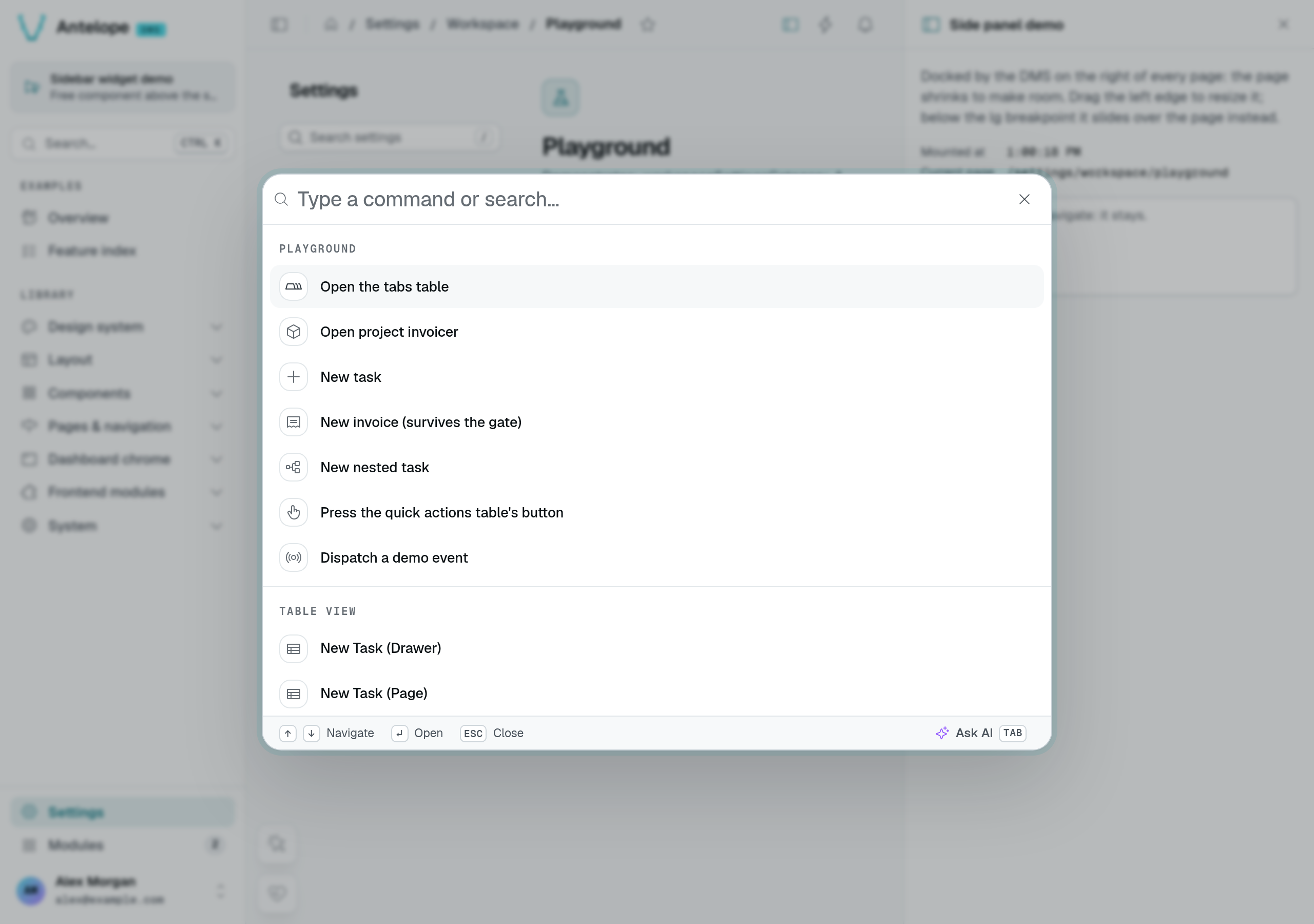
Start with Categories and Page URLs. Dynamic entries are for navigation built from request-specific data, such as the projects a member can access.
The root groups
The sidebar has three built-in roots: Pages (pagesCategory), Modules (modulesCategory), and Settings (settingsCategory). Everything you register attaches under one of them — directly or nested. You can also add your own top-level group with RootCategory(id, options); the ids pages, modules, and settings are reserved.
A project can register pages under settingsCategory (or a category nested in it, such as workspaceSettingsCategory) to add its own screens next to the built-in settings pages (Settings pages). The one restriction: a page that declares a module cannot use the Settings category — a module declares settings inside its own sidebar instead (Distributable module).
Categories
Category(id, options) returns a CategoryInfo you pass as a page's category. Categories nest — a category has its own category — and are usually rooted at pagesCategory. This is how a project anchors its own screens:
import { Category, pagesCategory } from "@antelopejs/interface-dms/page";

export const crm = Category("crm", {
  displayName: "CRM",
  icon: "i-ph-users",
  category: pagesCategory,
});
// then on a page:  category: crm
A category is a lightweight heading: a label that groups pages, with no landing page of its own. It does carry access behavior: a category registers its own permission (keyed to its fullId), and its hidden, publicAccess, authOnly, and memberAccess options cascade to the pages under it. The sidebar computes the category's visibility from that permission — a category the user cannot access hides its whole branch, and so does one the user can access but holding no entry they can open, the way the role preview locks it.
Default layout of a category
layout on a category is the default layout of its whole branch: every page and sub-category declared under it that names no layout of its own gets it. The nearest declaring ancestor wins, and a page's own layout (its layout option, or the third argument of PageController) always overrides it. A page used as a category passes its layout option down the same way.
import { SettingsLayout } from "@antelopejs/interface-dms/base/layouts";
import { Category, settingsCategory } from "@antelopejs/interface-dms/page";

export const billing = Category("billing", {
  displayName: "Billing",
  icon: "i-ph-credit-card",
  category: settingsCategory,
  layout: SettingsLayout(),
});
// pages declaring `category: billing` render in the settings frame
The built-in settingsCategory declares SettingsLayout() this way, so a settings page needs no layout argument; the example above only spells it out. The form pages a TableView generates take the layout of their page's category chain too. The full resolution order is in Layouts.
Entries that share one page
A menu entry normally points at its page's bare URL. Set query on the page — or on a dynamic entry — and the entry links to that page narrowed by query parameters, so a single page can back any number of entries:
@RegisterPage()
export class ProjectPage extends PageController("project", {
  displayName: "Project",
  category: crm,
  hidden: true, // the entries below are the way in
  validation: { requiredQueryParams: ["project"] },
}) {}
Pair it with validation.requiredQueryParams (Page setup and validation) so the page renders its error state when opened without context, or sends the user to its redirectTo. Entries of the same page are told apart by their parameters: only the one matching the current URL is highlighted, and the command palette lists them individually.
Dynamic entries
Static registration covers screens known at build time. When the entries depend on the caller's data — one per project, per workspace, per customer — register a provider instead: it resolves the entries of a category on every site-layout request.
import { RegisterDynamicMenuProvider } from "@antelopejs/interface-dms/page";
import { crm } from "./category";

RegisterDynamicMenuProvider(crm.fullId, async (user, tenantId, permissions) => {
  const projects = await listProjectsFor(tenantId, permissions);
  return projects.map((project, index) => ({
    id: project.id,
    displayName: project.name,
    fullSlug: "/crm/project", // an already registered page
    query: { project: project.id },
    icon: "i-ph-cube",
    order: index,
    status: project.isLive ? "success" : "neutral",
  }));
});
What the mechanism guarantees:
- Per request, never global. Entries are grafted onto the copy of the tree built for that request, so one tenant's entries can never reach another tenant's sidebar.
- One sort order, and a total one. Dynamic and static children of the category sort together by
order— a static "New project" entry with a highorderlands after the dynamic ones. Entries sharing anorderare then sorted by display name and by id, so the menu looks the same on every host and after every restart. - Access is enforced twice. The provider is not called at all when the caller cannot reach the category; an entry is dropped when it declares a
permissionIdthe caller lacks, or when the caller cannot access its target page. Your resolver still owns the data-level filtering (which projects this member may see). - What is shown is what the client can act on. An entry's
permissionIdis matched against the set the browser receives, exactly as the browser matches it: the*wildcard or a literal grant, never adefaultGrantedfallback the client is not told about. While a tenant access gate denies the tenant, that set is narrowed to the surfaces flaggedbypassTenantAccessGate— a recovery entry therefore declares its permission under its target page (<pageFullId>.settle), and an ordinary entry disappears for the duration instead of rendering inert controls. - Filtering is display, not authorization. An entry's
permissionIddecides whether it is listed. The target page receives the entry'squerylike any other caller-supplied input: it must authorize the value itself — a member who is not on project 42 must be refused by the page, not merely not offered the link. - Failures are contained. Providers run concurrently, and one that throws, hangs (a two-second budget applies, since resolvers run on the critical path of every page load), targets an unregistered page or collides with an existing entry id contributes nothing and is reported once — the rest of the menu still resolves, and its entries return as soon as it recovers.
The call returns a function removing the provider; registrations are removed automatically when your module unloads.
A provider is bound to the module that registers it, not to the category it targets. One whose category is not registered — not yet, or no longer — lies dormant with a single warning and resolves again as soon as the category appears, so neither module start order nor a hot reload needs coordinating.
Refreshing the menu
The entries are resolved per request, so a change in your data only reaches open browsers when you say so:
import { NotifyMenuChanged } from "@antelopejs/interface-dms/page";

await createProject(tenantId, input);
void NotifyMenuChanged(tenantId); // that tenant's sessions re-fetch their site layout
The signal carries no data: connected clients re-fetch their own /sitelayout and permission list, each resolved against their own access. Pass the tenantId whose data changed so only its sessions refresh; omit it to invalidate every connected session.
Entry appearance
Three semantic fields shape how an entry renders — both on pages (MenuOptions) and on dynamic entries. They are deliberately semantic, not classes: the theme decides the colors.
| Field | Values | Renders as |
|---|---|---|
variant | "default" (implicit) or "accent" | An accent entry uses the theme's primary color — for a call to action ("New project"). |
status | "success", "warning", "error", "neutral" | A colored state dot at the end of the entry (on the icon's corner when the sidebar is collapsed). |
badge | A short string ("3", "new") | A small neutral pill with a mono label at the end of the entry — counts, "new" markers. |
A status dot or a badge takes the end of the entry, the slot an entry with children uses for its expand chevron: a status dot shows on leaf entries only, and when a leaf has both, the badge wins.
A page without a static badge can take a live count from a table view tab declared with navBadge: true (Link tabs), or from any component through navBadge(...) (Components): the server counts it per caller on each page visit (not in the menu a browser keeps for minutes), and it shows in the main navigation and the settings one. A count may carry a tone (navBadge: { tone: "warning" } on a tab, { count, tone } from a component), and the pill is drawn in it, red for error, amber for warning; without one it stays neutral. Counts published for one page add up, in the strongest tone. A count of zero shows no badge.
Quick actions: the command palette
The sidebar is one way to reach a screen; the command palette (the search, Ctrl/Cmd+K) is the other. Among its groups — navigation, favorites, session commands — the backend contributes quick actions: shortcuts that jump somewhere or trigger something, grouped by category. (Frontend layers add further groups through the command-palette source registry.) Register a category once, then actions pointing at a target:
import {
  QuickAction,
  QuickActionCategory,
} from "@antelopejs/interface-dms/quick-actions";
import { PageTasks } from "./tasks";

const cat = QuickActionCategory("tasks", { displayName: "Tasks", icon: "i-ph-table" });

QuickAction("tasks-add", {
  category: cat,
  displayName: "New task",
  icon: "i-ph-plus",
  target: { type: "openForm", page: PageTasks, component: PageTasks.table },
});
Every target names the page the action belongs to, as a controller class rather than a URL: the route is derived from it, so a renamed page can never leave a stale link behind.
Access follows that page. An action is listed only when its page is listed — same permission, same tenant access gate, same bypassTenantAccessGate opt-out — so an action can never offer what its page refuses, and there is no second rule to keep in step. An openForm action additionally requires the target table's add permission, derived from the component itself; a button action requires the permission of the toolbar button it presses. Actions the caller cannot run are left out of the payload entirely, along with any category left empty.
| Target | Behavior |
|---|---|
{ type: "navigate", page, query? } | Routes to the page, optionally narrowed by query parameters. |
{ type: "openForm", page, component? } | Routes to the page and opens the creation form of the table view named by component. Optional while the page mounts a single component that can create a row; required once there are several, since every one of them would otherwise answer at once. |
{ type: "button", page, button, component? } | Routes to the page and presses the table's custom toolbar button whose id is button — it opens the same modal, drawer or page the button does. The action inherits the button's permission, so it is listed for exactly the callers the button is shown to. component follows the same rule as for openForm, among the components that declare that button id. |
{ type: "event", page, name, payload? } | Dispatches a window CustomEvent where the user stands. The page decides who may run it. |
Page URLs
Every page resolves at its fullSlug, and each root group contributes its own URL prefix — the rule is defined in Pages & components. Module pages carry the extra /modules/<moduleId> prefix, covered with the module rules below.
The breadcrumb of a detail page
The page header's breadcrumb follows the URL: each segment that is a category or a page shows its name, and the last one the record the page is about once its form or component names it (usePageRecordLabel). A hidden detail page usually lives beside its list rather than under it — /operations/project/:id next to /operations/projects — so the URL alone reads "Operations / parent and the breadcrumb shows it before the record, linked, so the page leads back to its list:
export class ProjectPage extends PageController("project", {
  displayName: "Project",
  category: operationsCategory,
  urlSlug: "project/:id",
  hidden: true,
  parent: ProjectsPage, // Operations / Projects / Solar farm Liège
}) {}
parent takes the list's controller, resolved when the page registers (import it, as for category). Route parameters of the parent's URL are filled from the detail page's own when they share a name; a parent the caller cannot open, or one whose parameters stay unfilled, is left out. A crumb that already opens the parent is not repeated.
Modules
A module is a self-contained feature area with its own separate sidebar: where a category is a heading under Pages, a module is closer to a mini-app inside the dashboard. A page joins one by setting module: "<id>", with category still grouping it inside the module's own tree — the two options are complementary, not exclusive. Module access is platform-owner-only by design, and module pages live under the /modules/<moduleId> URL prefix.
Building one is a distributable-module concern — RegisterModule, the attachment rules, module URLs, and the access model are covered in Distributable module.
Pages & components
Declare a page as a class and attach components to it as static fields — the shared frontend renders them, no Vue.
Actions & reactivity
The behavioral side of the component DSL — permissioned actions, the events components emit, action targets, and the watch-actions that make components react to each other from backend configuration.