Auth & permissions
The DMS ships a built-in authentication and RBAC layer. Authentication answers "who is calling"; permissions answer "may they see or do this". The login, two-factor, and recovery flows themselves are the previous chapter (Built-in authentication) — this one covers gating your routes and pages with them, and the permission model underneath.
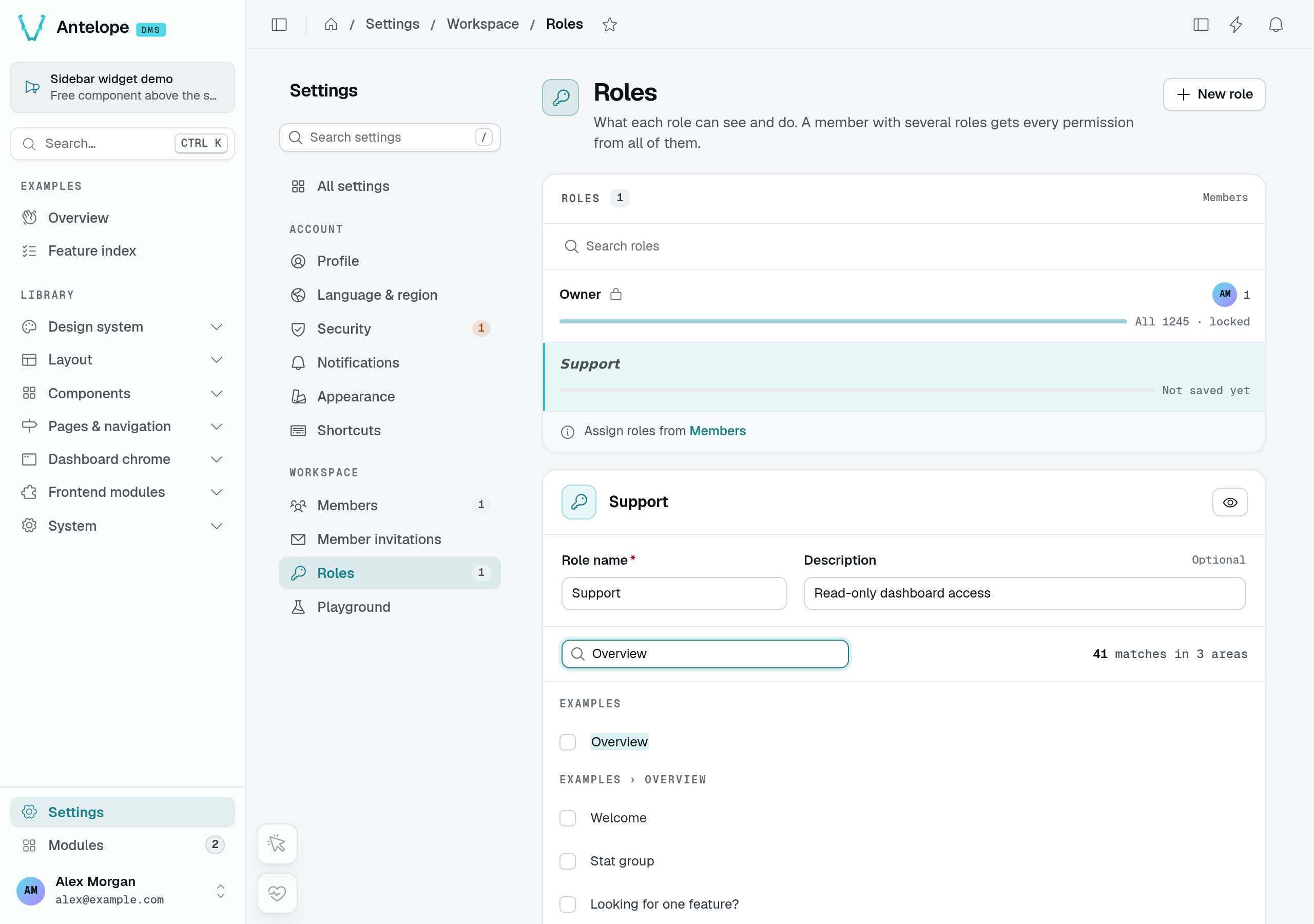
The Roles editor turns your page declarations into choices an administrator can grant. This screenshot shows an unsaved role with no grants selected, not a recommended policy. Start with the route decorators below; hiding controls in the UI never replaces backend authorization.
Compare real member access
The following comparison uses two signed-in accounts, not the role editor's preview. The administrator saved a Support role with the playground's Overview branch selected, then invited Jamie with that role. Both accounts can open their own Profile page, but only the administrator sees workspace administration.
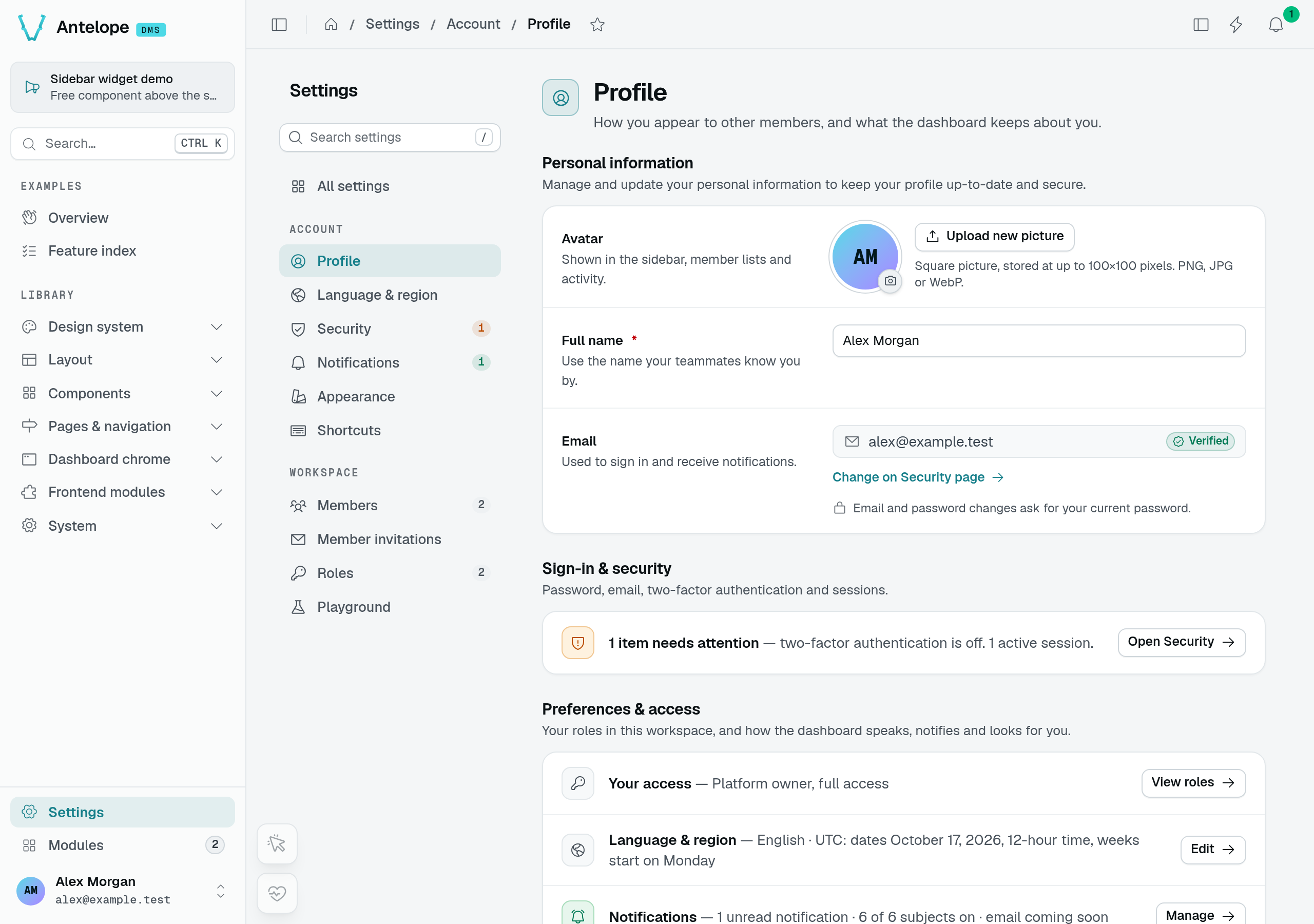
Administrator: Alex is a platform owner and sees the workspace settings.
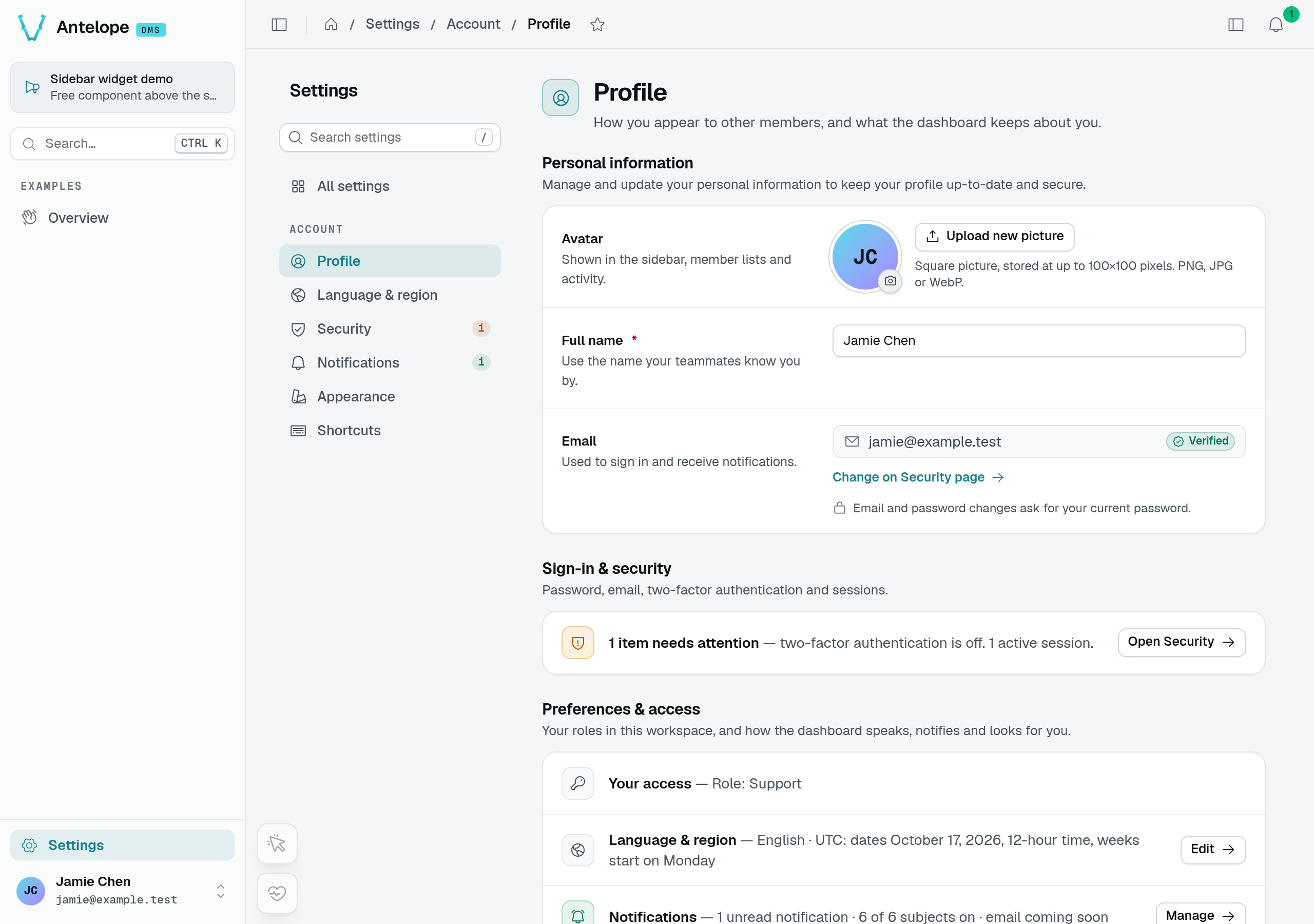
Member: Jamie holds Support. The sidebar keeps Overview; the settings, opened from the user menu, list personal account pages only.
The screenshots prove navigation differences, not API authorization. In the same demonstration, a direct authenticated GET /dms/pages/settings/workspace/roles/overview returns 200 for Alex and 403 for Jamie, with Forbidden: missing permission settings.workspace.roles. Always test the protected operation separately from the hidden menu.
Authenticate routes
Apply auth with parameter decorators on controller route methods. Each one resolves and injects the user, or rejects the request when its requirement isn't met:
import { Controller, Get } from "@antelopejs/interface-api";
import { AuthUserWithPermission } from "@antelopejs/interface-dms/guards";
import { AuthUser, IfAuthUser } from "@antelopejs/interface-dms/auth";
import { User } from "@antelopejs/interface-dms/auth/db"; // the User type lives in the auth domain

export class ThingController extends Controller("/api/things") {
  @Get("") async list(@AuthUser() user: User) {
    /* requires login, else 401 */
  }
  @Get("/public") async maybe(@IfAuthUser() user: User | undefined) {
    /* optional; undefined if anonymous */
  }
  @Get("/admin") async admin(@AuthUserWithPermission(SomePageController) user: User) {
    /* requires permission, else 403 */
  }
}
The decorators split across two sources along the authentication/authorization line — the interface-dms/auth decorators answer "who is calling", interface-dms/guards layers "may they" checks on top:
| Decorator | From | Requires |
|---|---|---|
@AuthUser() | interface-dms/auth | A logged-in user (validates the account); 401 otherwise. |
@IfAuthUser() | interface-dms/auth | Optional — injects User | undefined; anonymous is allowed. |
@AuthRawUser() | interface-dms/auth | The user without the extra validation @AuthUser does. |
@AuthOwnerOnly() | interface-dms/auth | A platform owner (not merely a tenant owner). |
@AuthUserWithPermission(target[, options]) | interface-dms/guards | A user and the permission tied to target (a page/component, or an Action); 403 otherwise. |
@AuthTenantOwner() / @AuthTenantMember() | interface-dms/guards | Tenant ownership / membership. |
The three interface-dms/guards decorators also run the tenant access gate before answering: when a registered gate denies the tenant, the request fails with a 403 carrying the gate's code. All three accept a { bypassTenantAccessGate: true } option for the few recovery routes that must stay reachable when the tenant is denied (billing, payment).
Authenticate pages
A page's auth comes from its PageController options (see Pages & components):
publicAccess: true— no auth required.authOnly: true— require login, no permission check.memberAccess: true— every signed-in member holds the page, its components and their actions without a role grant. The ids still exist and every check still runs (tenant access gate included); they are registered asdefaultGranted, so the Roles editor leaves them out. Meant for personal pages: the built-in account settings (settings.user.*) and the settings overview (settings) use it, the workspace settings (settings.workspace.*) do not.truepasses on to everything declared under the entry, page or category.memberAccess: "self"opens the entry alone: the settings root declares it, so a page undersettingsCategorykeeps its own permission.- (default) — require login and the page's auto-derived permission.
permission: <Partial<Permission> | Action>— attach a specific permission/action.noComponentPermissions: true— don't derive per-component permissions for this page.bypassTenantAccessGate: true— keep the page reachable while a gate denies the tenant, permission checks unchanged (see Tenant access gate).
Routes inherit their controller's auth. A route declared under a Controller(...) that a page or DataController wraps is already gated to logged-in callers — don't re-add a login check. Add finer checks (ownership, a specific permission) only when the route needs more than "is logged in". For example, the DataController/TableView (Data controller) list/get/edit/export routes are protected by the parent controller; they are not open endpoints.
Permissions & RBAC
Permissions are hierarchical and mostly auto-derived from the page → component → action tree. A component's permission id is the page's permission id followed by the component key, with nested children and actions appended.
The page's permission id is its fullId — its category chain plus the page id — unless the page declares one of its own with permission: { id }:
| Declaration | Derived permission id |
|---|---|
A form component on the page with fullId: "pages.form.form-grouped" | pages.form.form-grouped.form |
A delete action on that component | pages.form.form-grouped.form.delete |
The same form component on a page with permission: { id: "mailing.access" } | mailing.access.form |
Parent grants and page visibility
Every synchronously declared .child(id, component) position registers its own permission, including layout containers such as grid rows and stack items. Grants are exact: granting a parent makes the branch reachable but does not grant any child automatically, so a role needs the full chain of component ids it should render.
When a role is granted a page but none of its blocks:
- The served layout carries
allComponentsHidden: true, and the page shows a "nothing to show for you here" notice instead of a blank page. - The menu leaves the page out of the sidebar, settings navigation, command palette and first-page fallback. The role preview locks it, but it stays reachable by its URL.
- Pages nested under it keep their own entries. Opening the parent leads to the first of them the member can open — Member invitations, for a role that holds Members but none of its blocks.
A page declaring no block at all, such as a module page rendering its own content, is never left out this way. The Roles form selects descendants when you check a parent, but existing stored roles remain flat permission lists.
Required ancestors and dependencies
The reverse is enforced: a granted id counts only with every id it sits under. pages.sales.orders.table.delete grants nothing to a role that lacks pages.sales.orders.table, pages.sales.orders, pages.sales or pages — unless that parent carries defaultGranted or is not a registered permission.
Saving a role, through the roles editor or the /api/tables/roles routes, stores each permission with every id above it, and with the permissions it declares as dependencies (and the ids above those). A role saved through the API therefore reads the same as one built in the editor. Only registered ids are added: an id nothing registers (a module not loaded, a typo) is stored as given, without parents made up from its dotted path.
A check counts dependencies like the ids above: a granted permission counts only with every registered dependency it declares. A role stored outside the editor with an edit but no view grants no edit.
A table view's actions depend on the permission guarding what they read, and those only reached from the table's rows on its list:
| Action | Dependencies | Reason |
|---|---|---|
list | None | It shows the rows. |
select | None | defaultGranted: the relation pickers of other pages' forms read through it. |
add | list, unless its form opens as a page | Its button sits on the table; a form page is reached by URL. |
edit | view (with a view form), and list unless its form opens as a page | Its form loads the row through the view; it opens from a row. |
view | list, unless its form opens as a page | It opens from a row. |
delete, archive, viewArchived | list | Pressed from the rows. delete reads nothing, so it does not need view. |
restore | viewArchived (so list too) | Pressed from the archived rows. |
export | view (with a view form), list | It writes the @Exported fields, which may go past the columns list shows, and is offered from the table. |
A form opening as a page (formContainer absent or { type: "page" }) keeps no list dependency: a member can be granted the one record a notification links them to, without the table. A form opening over the table (drawer, modal, side panel) is only reached from its rows.
A role given a table's edit or export gets its view and its list too, and unticking the view or the list in the roles editor unticks them. These are enforced server-side like any dependency: a role written through the API with an edit but no list grants no edit.
Custom actions declared on a table with .action() declare their own dependencies: ["list"] when they are pressed from the rows.
Component permissions register with the page — when its @RegisterPage decorator runs — unless the page sets noComponentPermissions (or authOnly). Under memberAccess they register as held by every member.
Users hold roles; a role holds a flat list of granted permission ids; a platform owner holds * (everything).
Register a standalone permission
When a module needs its own permission (for example a "view" vs "export" split), register it — usually in construct:
import { RegisterPermission } from "@antelopejs/interface-dms/permissions";

RegisterPermission("reports.export", {
  id: "reports.export",
  title: "$my_app.perm.reports_export", // i18n key — add to every locale file
  icon: "i-ph-download",
  defaultGranted: false,
  dependencies: ["reports.view"], // granted with it: the roles editor adds them, and a saved role is stored with them
});
A Permission carries an id and a title, optional icon, description, and dependencies, and a defaultGranted flag. Then gate with @AuthUserWithPermission(...) on routes, or via the page/component permission option. GetPermission(id) and GetPermissions() read the registry.
How the effective set is computed
A user's permissions are resolved in two steps:
- The base set comes from roles: the union of the granted ids of the user's roles in the current tenant — or
Set("*")for a platform owner. - That set runs through the registered permission resolvers, which may add or remove entries. The result is the effective set.
Every permission surface consults the effective set — @AuthUserWithPermission, the permission list the frontend reads, page and menu visibility, table-view actions, search — so the dashboard never shows an entry its routes would refuse.
Who can grant what
The DMS sets no cap on what a role or member editor may hand out. Whoever holds these permissions can give anyone any permission, including * (everything) and workspace ownership — even permissions they do not hold themselves:
| Permission | What its holder can grant |
|---|---|
settings.workspace.roles.table.add / .edit | Any permission, * included, to a new or existing role — their own roles included. |
settings.workspace.roles.table.delete | Moves every holder of the deleted role to any other role (reassignTo in the delete dialog). |
settings.workspace.members.table.edit | Any role to any member, themselves included; workspace ownership ("Make owner"). |
settings.workspace.members.table.add | Invitations carrying any role, or ownership of the workspace. |
settings.workspace.invites.table.edit | Any role, or ownership, on a pending invitation. |
This is the intended model, not an oversight: editing roles or members is an administrator's right, and "grant only what you hold" is not enforced. Give these permissions only to people you would make owners, and keep the rest of your roles free of them. The owner-safety guards still apply: the last owner of a workspace cannot be demoted or removed.
The Roles editor says so where it matters. The members table's edit and add, the invitations table's edit and the roles editor's add, edit and delete carry an amber warning on their row, a closed row above one that is ticked shows an "Owner-level access" chip, and a role holding any of them gets a summary above the tree. The role pickers of the invite and "Change roles" forms repeat it when such a role is picked.
Check a permission imperatively
To test a permission outside the decorators, resolve the caller's effective set, then check the id against it:
import {
  GetEffectiveUserPermissions,
  HasPermission,
} from "@antelopejs/interface-dms/permissions";

// base set (roles / owner wildcard) passed through the permission resolvers
const permissions = await GetEffectiveUserPermissions(user, tenantId, roleIds, roleModel);

// true on the "*" wildcard, a defaultGranted permission, or a direct grant
// whose parent ids are held too
if (await HasPermission(permissions, "reports.export")) {
  // …
}
GetEffectiveUserPermissions is exactly what the built-in surfaces use, so an imperative check with it always agrees with the decorators. The lower-level GetUserPermissions(user, roleIds, roleModel) still exists but returns the base set only, before resolvers — do not authorize against it directly.
Permission resolvers
A permissions resolver is the hook a module registers to reshape the effective set: it receives the caller's current permission set for a tenant and returns a new one, adding or removing entries. This is how a module changes what users can do without touching their roles — dms-saas registers one to intersect each user's permissions with their tenant's plan (SaaS mode).
import { RegisterPermissionsResolver } from "@antelopejs/interface-dms/permissions-resolver";

RegisterPermissionsResolver({
  id: "my_app.trial-limits",
  order: 100, // ascending — later resolvers see this one's result
  resolver: async (userId, tenantId, currentPermissions) => {
    // return a new Set to add or remove effective permissions for this user/tenant
    return currentPermissions;
  },
});
Resolver semantics to rely on:
- Resolvers run in ascending
order, each receiving the previous one's result; equalorderruns in registration order. - A resolver that throws fails the request (fail-closed) — it is never silently skipped.
- The registration is removed automatically when the registering module unloads; there is no manual unregister call.
- Register in your module's
construct()so the resolver is active before the API starts serving requests. - The roles editor's preview runs the resolvers too, over the previewed role's set, with
context.previewset (the resolver's fourth argument), for the user previewing. A resolver keyed on the user (an owner handed every permission of the plan, a screen kept for owners) must skip that standing whencontext.previewis set, so the preview matches what a member holding only the role is served.
@AuthUser-only routes, tenant membership guards) and it cannot revoke a permission registered with defaultGranted, which HasPermission grants after the resolvers run. To cut a tenant off from the product entirely, use a tenant access gate instead of returning an empty set.Tenant access gate
A tenant access gate is a binary, tenant-level access check: it decides whether a tenant may use the product at all, independently of what any permission set says. Every tenant authorization surface enforces it — @AuthUserWithPermission, @AuthTenantOwner/@AuthTenantMember, table-view data routes, page and menu visibility, realtime page access — so one registration cuts a tenant off everywhere at once. dms-saas registers one to lock workspaces with a blocking subscription status (SaaS mode).
import { RegisterTenantAccessGate } from "@antelopejs/interface-dms/tenant-access";

RegisterTenantAccessGate({
  id: "my_app.subscription-status",
  order: 100, // ascending — the first denial wins
  gate: async (userId, tenantId) => {
    if (await tenantIsBlocked(tenantId)) {
      // the code becomes the 403 body — a machine-readable i18n key the
      // frontend can match on
      return { allowed: false, code: "my_app.errors.tenant_blocked" };
    }
    return { allowed: true };
  },
});
Gates follow the same lifecycle rules as resolvers: ascending order with the first denial winning, fail-closed on throw, automatic unregistration on module unload, and registration in construct(). userId is undefined for unauthenticated requests.
A denial is enforced in two modes. Route guards answer a hard 403 whose body is the gate's code. The site layout, permission list, and realtime surfaces degrade softly instead — the user keeps an authenticated session, publicAccess/authOnly pages stay reachable, and everything permission-gated reports no access — so a dedicated recovery screen can still render. Routes that must stay reachable for a denied tenant opt out explicitly:
@Post("/portal-session")
async createPortalSession(
  @AuthTenantOwner({ bypassTenantAccessGate: true }) user: User,
) {
  // the recovery path a blocked tenant uses to pay
}
A page opts out with the mirror option in its PageController options:
@RegisterPage()
export class BillingPage extends PageController("billing", {
  displayName: "Billing",
  category: workspaceSettings,
  bypassTenantAccessGate: true, // the recovery screen of a blocked tenant
}) {}
The flag covers the page's visibility (site layout and menu), its layout route, and the permissions the client keeps for that surface — the permission list of a denied tenant is narrowed to the flagged pages and their components instead of being emptied. One deliberate exception: a caller holding the * wildcard keeps it whole, because the platform owner is usually the one who has to use the recovery page; the wildcard is still only handed out when at least one surface carries the flag, and every route keeps enforcing the gate regardless. Permission checks still apply in full, unlike authOnly, which would drop them. A flagged category passes the flag to its pages. The data routes feeding the page are not covered: a data API is not owned by a single page, so it opts out through its own guard option, as above — or, for table-view data routes, through the mirror bypassTenantAccessGate option in TableViewOptions, which keeps the table readable (view, list, select) and leaves every write, plus export, gated (Tables).
The DMS's own notifications API (/settings/user/notifications/*) opts out too: a user's notifications are not tenant data, and the header bell requests them on every page, the recovery page included. It asks for a signed-in user (@AuthUser) and no membership either, so a member removed from their workspace still reads their notifications, the one telling them they were removed included. Layout-level widgets that call the API on their own (on mount, on a realtime event) should handle a failure locally, since an unhandled rejection reaches the app error handler and replaces the whole page with the error screen.
To test the gate imperatively, CheckTenantAccess(userId, tenantId) returns the first denial (or { allowed: true }), and AssertTenantAccess(userId, tenantId) throws the corresponding 403.
Built-in authentication
The complete auth system the DMS ships — sessions and token rotation, invite-based signup, login with tenant selection, two-factor, email validation, and password recovery.
Multi-tenant data
Scope models to a tenant, query across tenants, manage memberships, and invite users into a tenant.