Form sections
A long settings form reads better as titled parts — Agent, Approvals, Limits — than as one column of fields. Give Form its fields as sections instead of several forms: each section is a card on the same page, a navigation leads to each, and one submit saves them all.
Declare the sections
static form = Form({
  title: "Assistant settings",
  fetchUrl: "/api/assistant/settings",
  submitUrl: "/api/assistant/settings",
  sections: [
    {
      id: "agent",
      label: "Agent",
      icon: "i-ph-robot",
      description: "Which agent answers, and how long it thinks.",
      fields: [
        { id: "agent", label: "Coding agent", type: new DefaultDataTypes.SelectType({ items: AGENTS }), required: true },
        { id: "thinking", label: "Thinking", type: new DefaultDataTypes.SelectType({ items: THINKING }) },
      ],
    },
    { id: "approvals", label: "Approvals", icon: "i-ph-hand-palm", fields: [/* … */] },
    { id: "limits", label: "Limits", icon: "i-ph-gauge", fields: [/* … */] },
  ],
});
A section (FormSection) takes:
| Property | Type | Purpose |
|---|---|---|
id | string | Anchor of the section, unique within the form. Required. |
label | string | Title of the card and of its entry in the navigation. Required. |
description | string | A line under the card's title. |
icon | string | Icon of the section's entry in the side navigation. |
navGroup | string | Heading the section's entry sits under in the navigation, side list or chips ($-prefixed: i18n key). |
fields | (FormField | FieldGroup)[] | The fields and groups of the section. Required. |
fields and sections can be combined: the form's own fields come first, outside any section. A section's fields are ordinary form fields — every type, group, note and watch works the same — and they still submit as flat top-level keys: sections only shape the page.
Section navigation
sectionNav decides how the form lists its sections:
sectionNav | Renders |
|---|---|
side | A list beside the cards that follows the scroll (scroll-spy on anchors, not tabs). On a form narrower than 880px, it becomes a row of chips above the cards. |
jump | A row of chips above the cards. |
none | No navigation. |
Left out, it is side from three sections and none below.
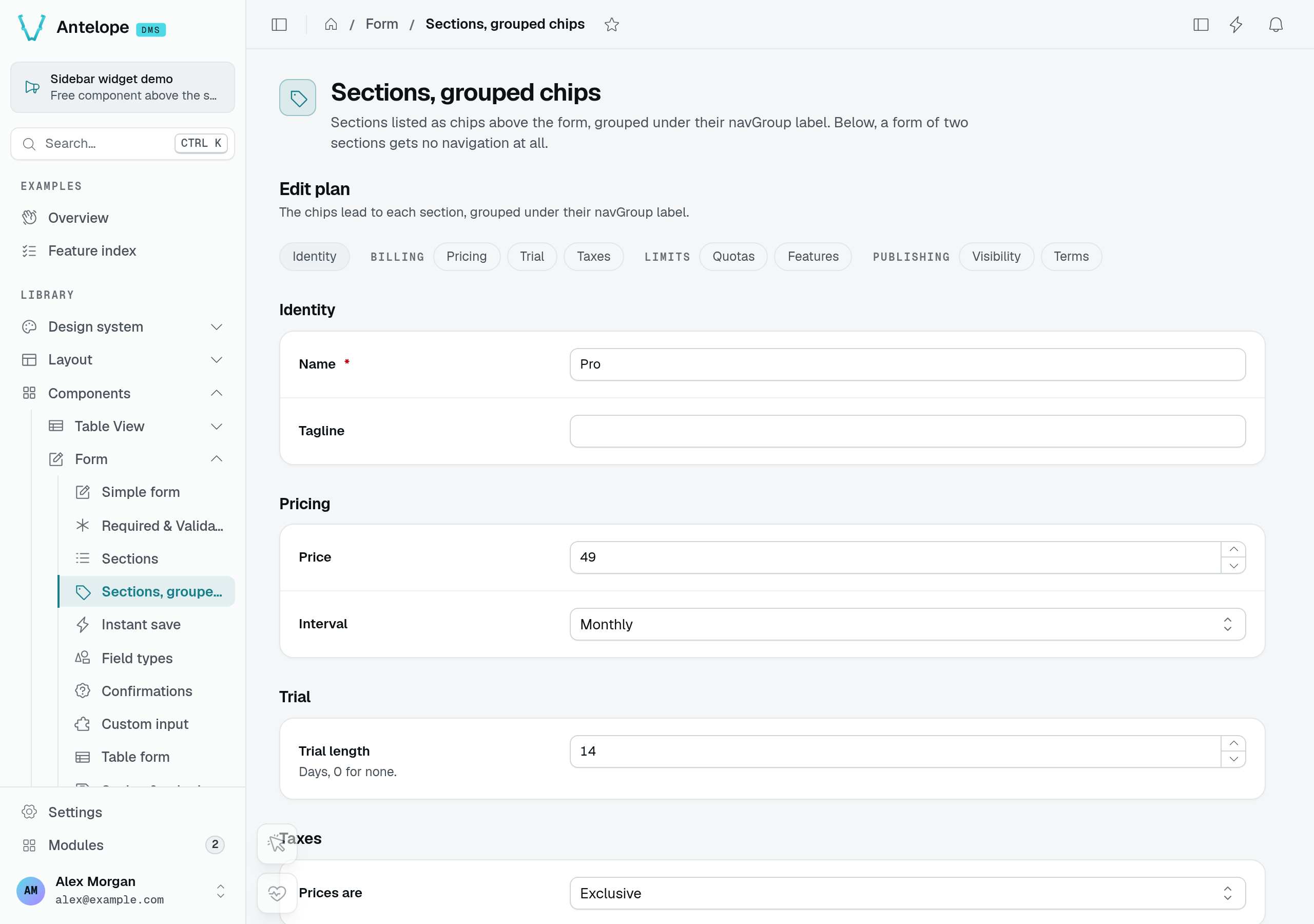
The Sections, grouped chips playground page groups its links under Billing, Limits and Publishing. These links scroll to cards on the same form; they do not switch tabs or submit it.
A form of six sections or more reads better in parts. Give the sections a navGroup and the side list sets a heading above each run of sections sharing one; a section without it, or the first ones before any group, sit at the top without a heading. Only consecutive sections share a heading: a group named again further down starts a new run.
The row of chips — jump, or side on a narrow form — groups them the same way: each run of chips follows its group's label, and the runs wrap onto as many lines as the form's width needs. Without any navGroup, the chips stay one row that scrolls sideways. jump with groups suits a form whose side column is taken, such as an editor with a live preview beside it.
sections: [
  { id: "plans", label: "Plans", fields: [/* … */] },
  { id: "dunning", label: "Dunning", navGroup: "$saas.rules.billing", fields: [/* … */] },
  { id: "taxes", label: "Taxes", navGroup: "$saas.rules.billing", fields: [/* … */] },
  { id: "terms", label: "Terms", navGroup: "$saas.rules.legal", fields: [/* … */] },
],
Each section has an anchor, #dms-form-<component id>-section-<section id>: an entry of the navigation scrolls there, and a link carrying it scrolls there on load.
What each section shows
Every entry of the navigation carries the state of its section, with nothing to declare:
- An amber dot while the section holds unsaved changes.
- A red dot and a count ("2 fields to fix") once some of its fields are invalid.
The save bar names the changed sections (and the changed fields outside any section) instead of listing every field. In a form with saveMode: "instant", the form's save state shows under the side list (Saving).
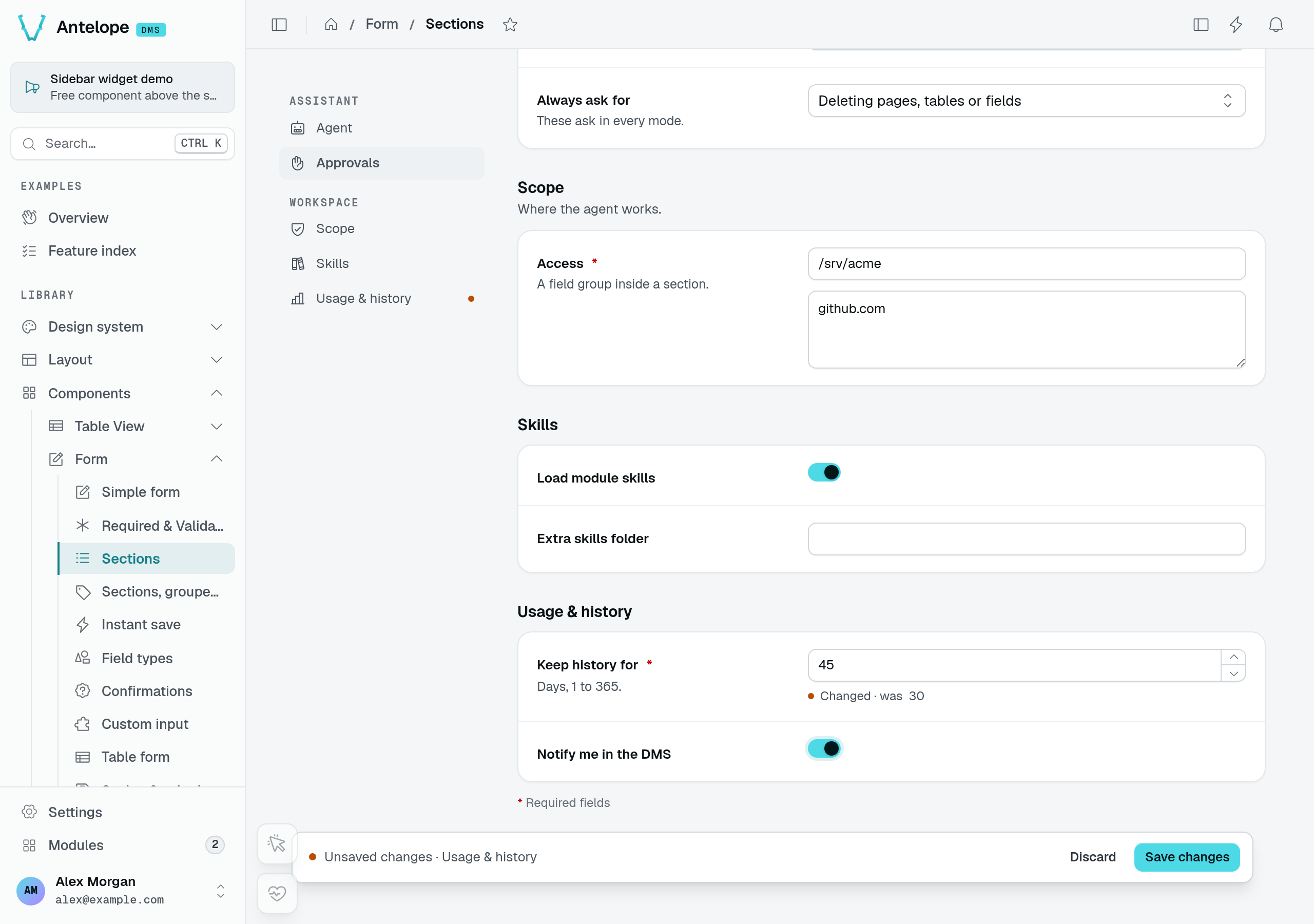
In the Sections playground page, changing retention from 30 to 45 days marks Usage & history in both the navigation and the save bar.
The validation summary
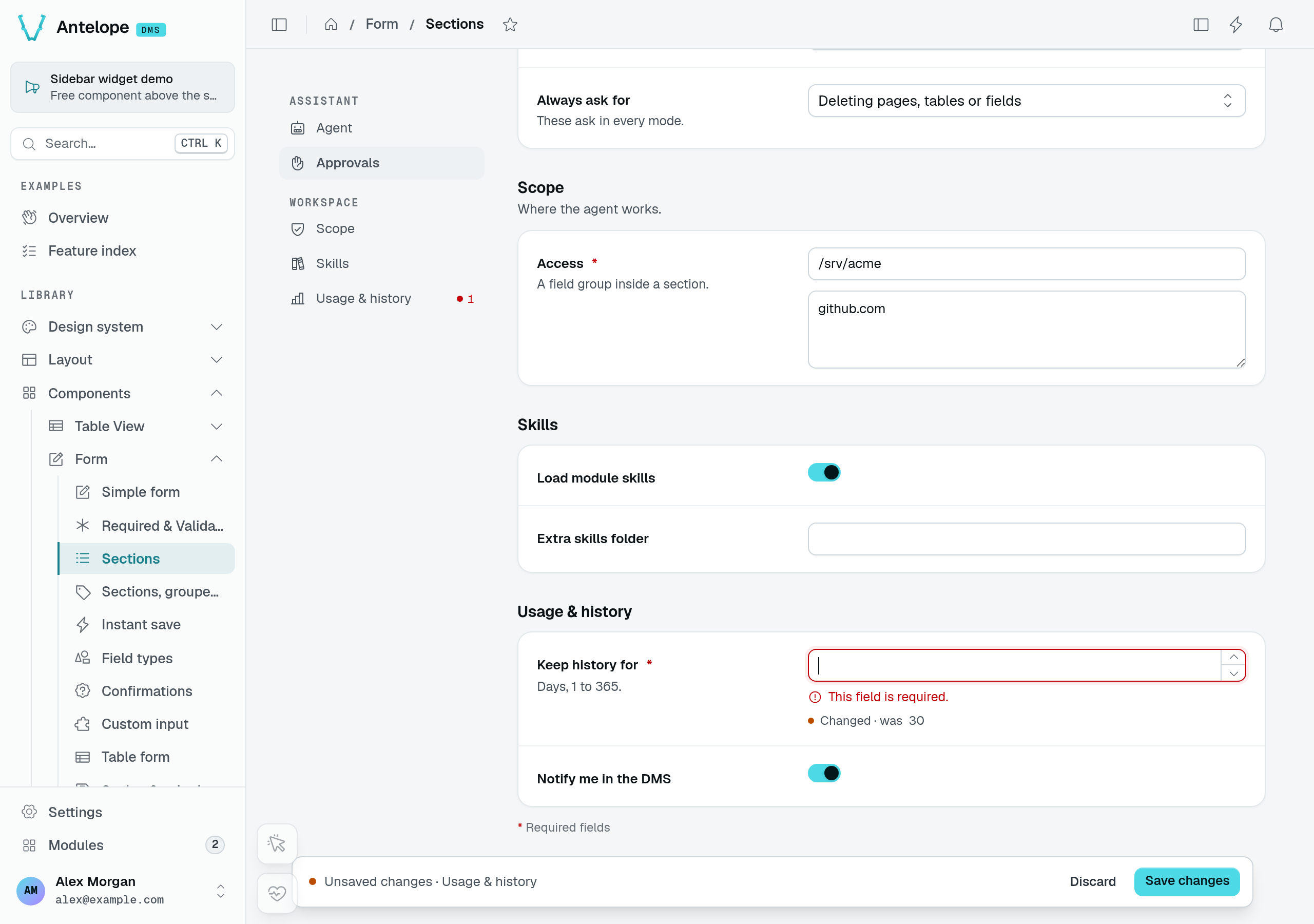
Every form, sectioned or not, gets a validation summary. Once a submit is refused — by the client's validation or by the server — an alert above the fields says how many need attention and lists them as links; each link focuses its field, and in a sectioned form it names the section too. The alert goes away once the fields are fixed or the form is saved.
A field's own error shows under it, with its border, aria-invalid and focus. A control can refuse what was typed into it before any submit — a duration it cannot read, JSON that does not parse, an address in a list of emails that is not one — and that message counts as the field's error: it blocks the submit and joins the summary.
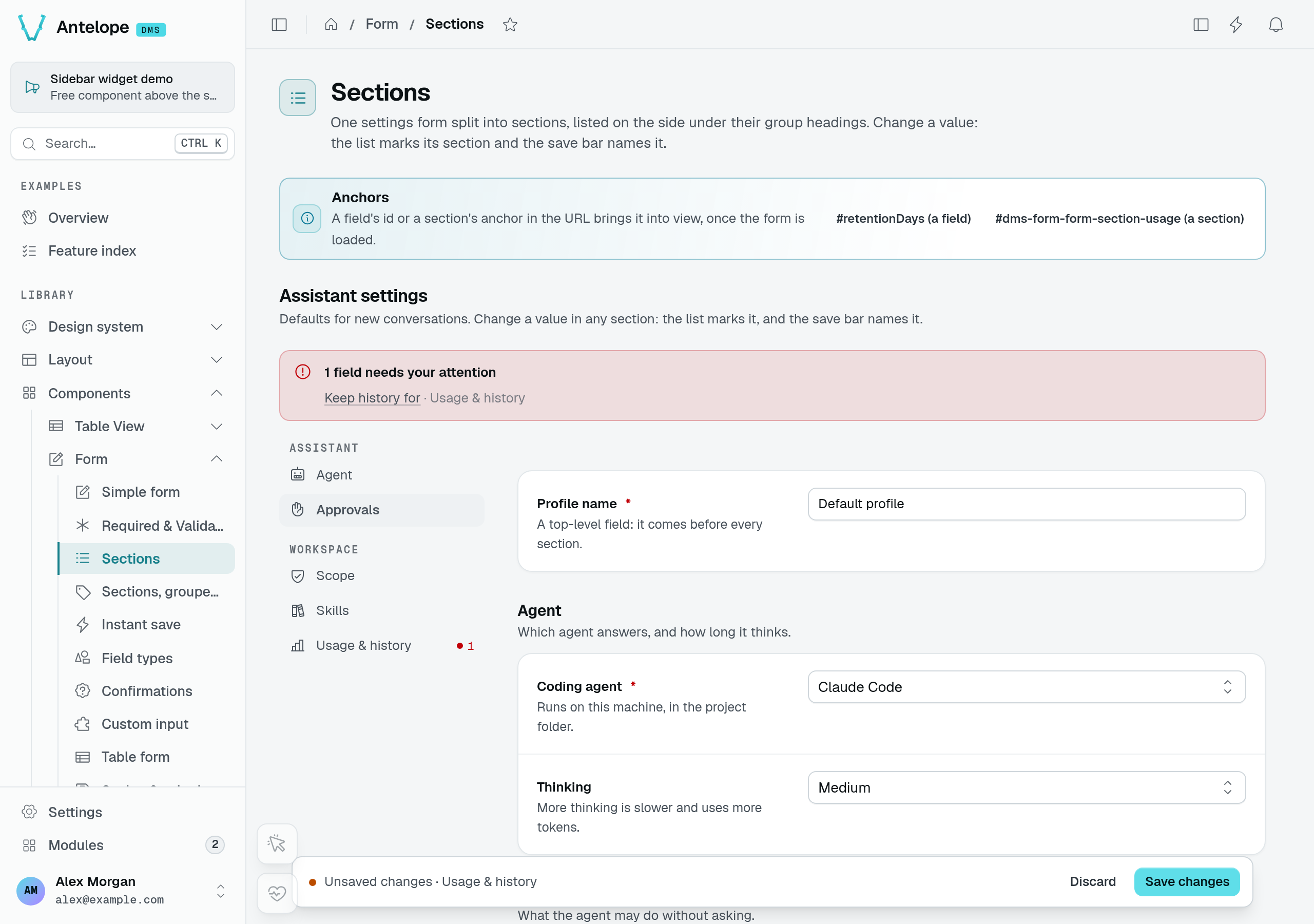
Submitting the same form with retention empty produces a summary link at the top. The section navigation counts one invalid field, and the field explains that it is required.
Server errors on a part of a field
The server names the field it refuses in a validation issue (assertValidation), a { message, field } body or the data API's Missing mandatory fields: … (Guards). When a validation issue's path reaches into a field — ["address", "postalCode"], ["title", "fr"], ["categories", 2, "name"] — the form puts the error on that part when the control has one (the postal code of an address, the French translation of a localized field, the cell of a repeater row), and on the whole field otherwise. Frontend code reading the same errors through the useFieldErrors composable gets the part as ApiFieldError.path (address.postalCode).
A { message, field } body may carry params, plain values filling the placeholders of the translated message: { field: "budget", message: "$page.campaigns.error.budget_max", params: { max: 5000 } } shows "At most 5000" when the key reads "At most {max}". A param that is not a string, a number or a boolean is dropped. Frontend code gets them as ApiFieldError.params, and useFieldErrors fills them in the same way.
How a sectioned form is served
The client reads a sectioned form as before: fields holds every entry — the form's own, then each section's — and sections lists { id, label, description?, icon?, fieldIds }, the ids of the entries each section holds. Slot contributors and client code reading fields keep working.
On the backend, FormProps.fields is optional, since a form may declare sections only: read every entry with formEntries(options), and build the schema of a section-only declaration with formSchema(options), both from @antelopejs/interface-dms/base/form.
import { formEntries, formSchema } from "@antelopejs/interface-dms/base/form";

const schema = formSchema(AssistantSettingsPage.form);     // every section's fields
const ids = formEntries({ sections }).map((entry) => entry.id);