Pages & heatmaps
Where: /modules/marketing/pages — under Analytics.
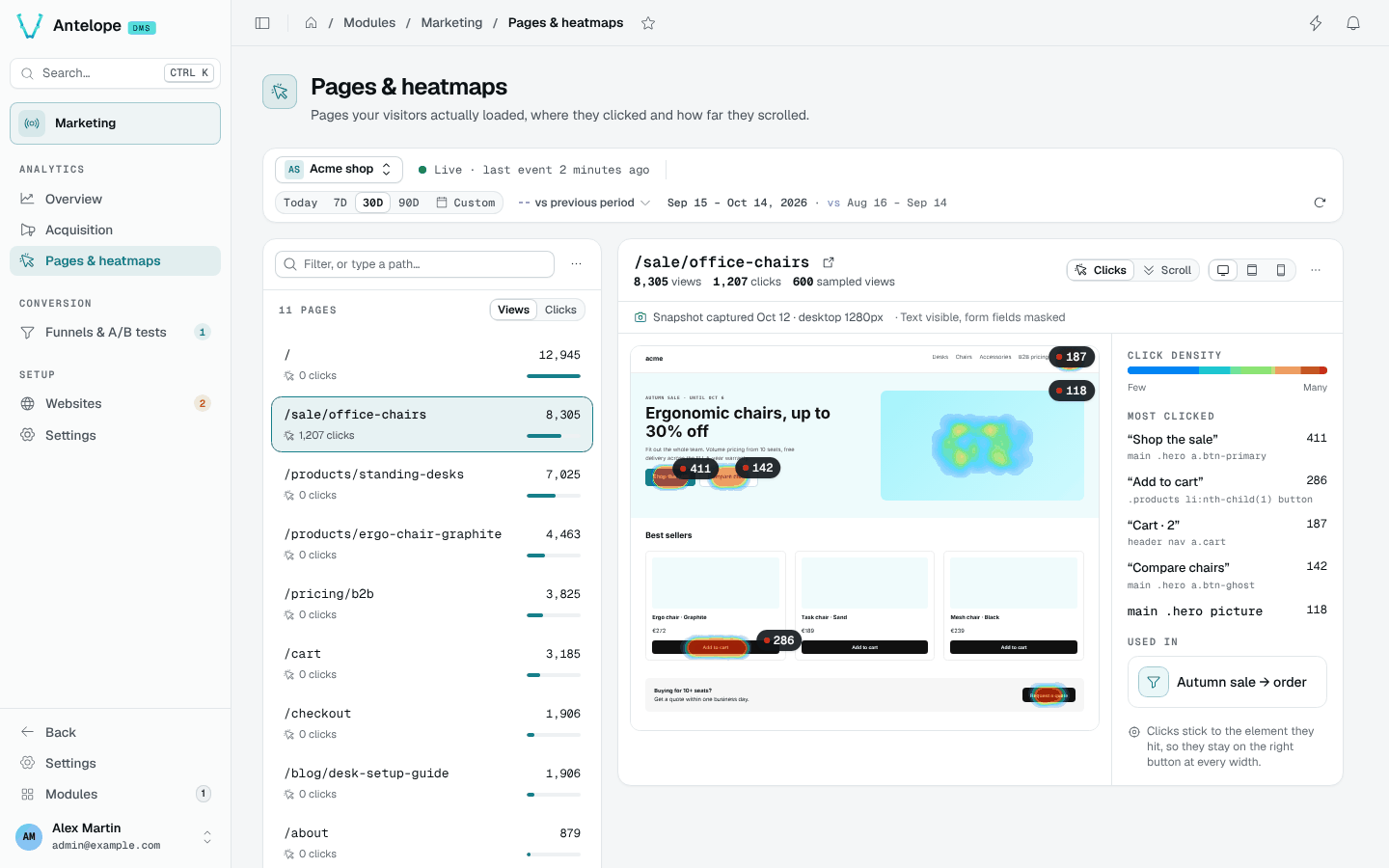
The page has two panes under the context bar: on the left, the inventory of paths the tracker has reported for the selected website; on the right, the clicks and scroll depth of the selected path, drawn over a snapshot of the page. The preview's toolbar switches the overlay between Clicks and Scroll depth above the same backdrop, and the layout between desktop, tablet and phone widths.
The surface is keyed on nothing but a website id and a bare pathname the tracker itself reported — no route registry, no sitemap, no build manifest, no framework convention — which is what makes it hold for a tracked site built any way at all.
Reading a heatmap
- Pick a website and a period in the context bar, then a path in the inventory. Each row gives the page's views, an estimate of the sampled visits behind its heatmap (views × sampling rate) and a heat bar relative to the busiest page.
- The right pane renders the page's snapshot (see Page snapshots below) and draws the recorded clicks over it, sized to the page's own height. The hottest anchored elements carry a pin with their click count.
- Beside the preview, Most clicked lists the five anchored elements with the most clicks, by their text, and Used in lists the funnels that have a page step on this path.
The selected path lives in the URL (?path=), so a heatmap can be linked
to; the overview's content lists link here that way.
Clicks stick to elements, not to screen positions
Each click stores which element it hit and where inside it (a short CSS selector plus a 0–1 offset in the element's box), on top of plain document coordinates. The overlay projects from the element anchor whenever it can resolve it in the snapshot. The practical effect: clicks recorded through desktop windows still land on the right button when you view the page at phone width, even though the layout moved everything around. The Most clicked list and the pins are built from these anchored cells only; while a page has none, the list says so and the clicks show on the page only.
Every way anchoring can fail (no snapshot yet, element gone, selector now ambiguous) falls back to document fractions — which is also all that clicks captured before anchoring ever had, so those render approximately. The mechanism is detailed in Architecture.
Scroll depth
The Scroll depth overlay shades the page by how many of the measured views saw each band — warm at the top, cold where almost nobody went — with labelled lines at fixed shares ("50% of visitors see down to here") and a readout following the pointer.
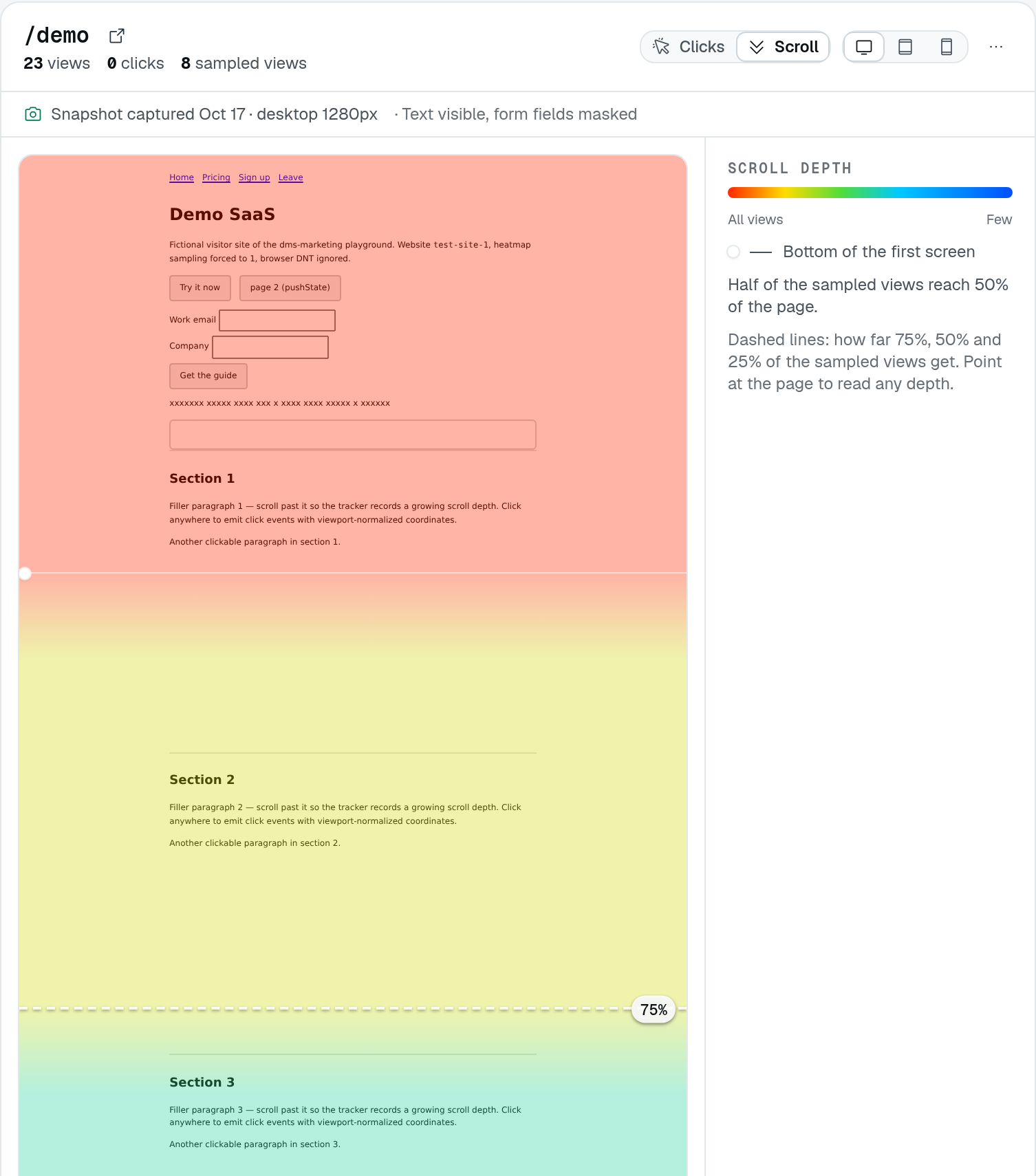
Local demonstration, cropped to the upper part of the page. The colours show the share of measured views that reached each depth. The 75% line means three quarters of those views reached that depth — not that they read 75% of the page. Depth runs from 0 at the bottom of the first screen (the solid line) to 100 at the page bottom, relative to each visitor's scrollable range.
Three things to keep in mind when reading it:
- Shares are "of the measured views". The tracker records the max depth reached per sampled page load, scrolled or not: a view that never scrolls reports 0 (100 on a page that fits the screen). Views recorded before the tracker did so only counted when they scrolled.
- Depth is a fraction of the visitor's scrollable range, measured through windows this dashboard cannot know. The overlay anchors depth 0 at the bottom of the first screen (the viewport the snapshot was captured in) and 100 at the bottom of the page: read bands and lines, not pixels.
- Same sampling, same window as clicks — one draw per page load decides both, and both read the raw events retention.
Resetting a heatmap deletes clicks, scroll depths and snapshots together (see Resetting heatmaps).
Page snapshots
The backdrop is not the live site in a frame: it is a snapshot of the
page, captured in a visitor's browser by the tracker and replayed here.
Framing the live site was abandoned because most production sites refuse
it — X-Frame-Options or a CSP frame-ancestors, which Nginx, Cloudflare,
Helmet and framework templates set by default — and a refused frame gives
the console no signal at all: a blank panel and a guess.
How a snapshot comes to exist:
- Opt-in, per website. Snapshots store page content, which nothing else
in the module does. They are off until the site enables them: while they
are off, the preview's status strip carries Enable page snapshots;
the preview's More menu holds both options (page snapshots on/off,
mask all text), and so does the Capture tab of the website's drawer
on the Websites page. Over the API the fields are
snapshotsEnabledandsnapshotMaskTexton the website (PUT /api/marketing/websites/:id). - Negotiated capture. On a visit already sampled for clicks (the same draw, 10 % by default), once the page has loaded and gone idle, the tracker asks the backend whether a capture of this path at this layout is wanted. It is when none exists or the existing one is older than a day; the answer is then the capture script itself, otherwise nothing. So the first sampled visit of a page captures it, a page is captured about once a day however busy it is, and no visit uploads a capture that would be discarded.
- Serialization in the visitor's browser. The rendered DOM — what the visitor sees, whatever built it, client-rendered SPAs included — is serialized into one self-contained HTML document: same-origin stylesheets inlined from the CSSOM (CSS-in-JS included), URLs made absolute, cross-origin stylesheets left as links, open shadow roots emitted as declarative shadow DOM. Captured after the DOM has gone quiet and in idle time, so the visitor's page never waits for it.
- Replay. The console renders the document in a sandboxed frame: no script runs in it, nothing in it can be clicked, hovered or navigated — a stray click would take the backdrop to a page the numbers are not about — and its geometry is read directly to place anchored clicks. Interacting with the real page goes through Open in the preview's More menu, which opens a new tab on the origin the snapshot was captured on.
A page the tracker cannot capture — one not online yet, or one whose clicks
came from imported history — has counts but no backdrop. A project can
declare its snapshot from code with EnsurePageSnapshot
(Extending): the document is sanitized
like a capture and shown the same way, and the first capture of the live
page, a day or more later, replaces it.
One snapshot is kept per (website, path, layout), the layout being the visitor's viewport width bucketed as desktop (≥ 1024 px), tablet (≥ 600 px) or phone. Asking for a layout nobody has been captured at reflows the nearest one at that width, and the status strip says so; anchored clicks still land on their element.
The numbers never degrade, and nothing is drawn without a page. Points and totals come from the database; the snapshot is the surface they are drawn on. Snapshots off for the site, no sampled visit captured yet, a page too heavy to capture — the click and scroll counts stay in the header, the status strip says why there is no backdrop and when there will be one, and no empty pane pretends to be a page. Otherwise a status line under the toolbar gives when and at which layout the snapshot was captured, and what it masks.
The status strip
When something needs attention, the preview shows one strip under its toolbar, the highest-priority one, with its own action where there is one:
- Collection is off — the tracker is switched off in the settings; links to them.
- Page snapshots are off for this site — with Enable page snapshots.
- No snapshot of this path yet — the next sampled visit captures one.
- Page too heavy to capture — see Retention and size below.
- Partial heatmap / partial scroll depth — the page recorded more clicks or scrolls than one read covers; narrow the period.
- Page too tall to preview accurately — the document exceeds the largest surface the browser draws, so the overlay and the backdrop no longer line up; the figures are unaffected.
- Approximate layout — no visitor has been captured at the chosen width, so the nearest snapshot is reflowed.
- Page wider than the chosen layout — the backdrop may be cut off; the overlay follows the document and stays aligned.
What is and is not captured
Unconditionally, whatever the options:
- Form values never leave the page. Input and textarea values, checked
and selected states are dropped; hidden inputs are dropped whole;
contenteditabletext is masked. - Nothing executable. Scripts, event handler attributes,
javascript:URLs,<noscript>content, frames, objects and embeds are dropped. - Links keep their target without query string or fragment — tokens and addresses ride there, and nothing in the backdrop is clickable anyway.
- Canvases are frozen as images (when not tainted), videos keep their poster, images keep the source the visitor's browser actually chose.
Markers the integrator can put on any element of the site:
data-dms-marketing-mask(or the classdms-marketing-mask) masks every character of the text inside, keeping whitespace so the layout holds.data-dms-marketing-block(or the classdms-marketing-block) replaces the element with an empty box of the same size, id and class kept so the page's CSS still lays it out and clicks anchored to it still resolve.
The per-site option Mask all text masks every text node of the capture; images stay, so block the personal ones. Changing either option discards the site's existing snapshots; the next sampled visits recapture under the new rules.
Retention and size
Snapshots live under their own retention — page snapshot retention in Settings, 30 days by default, never longer than the raw events — and are replaced daily while the page keeps being visited. They die with a heatmap reset (the page changed), with the site, and with the tenant. A site keeps at most 1000 of them; a page past that cap gets no backdrop.
A capture is at most 1 MiB, the whole upload, and that is a real limit
on markup-heavy pages: what counts is the HTML and the CSS, never the
images, videos or fonts, which stay URLs the console reloads from your site.
When a visitor's browser serializes past the cap, it uploads the size it
reached instead of the document. The page then has no backdrop and says so —
"Page too heavy to capture: the last sampled visit serialised 3.4 MiB of
HTML and CSS, past the 1 MiB upload cap" — with the click and scroll
figures untouched, and a capture is retried daily. Two ways under the cap:
trim the markup (a table of thousands of rows, a design system inlined in
full), or wrap the heavy part in data-dms-marketing-block, which keeps its
box and drops its content.
What overshoots the cap is a page's markup, so it is rare: a normal page of a few hundred KB of HTML and CSS stays far below it whatever it weighs in media.
Limits worth knowing
- Viewport-relative sizes. The frame is as tall as the whole page, so
inside it
100vhwould be the page, not a screen. The console rewritesvh,svh,lvh,dvh,vminandvmaxin the captured stylesheets to the pixels they had in the visitor's viewport before rendering; only a stylesheet the capture could not inline (cross-origin) keeps them, and a media query on the viewport height still sees the frame's. - Late content. Data fetched long after load, infinite scroll, sections lazily rendered below the fold: whatever had not landed when the DOM went quiet is missing or in its loading state.
- Fonts and cross-origin styles. A stylesheet the browser refuses to read (cross-origin) stays a link fetched by the admin's browser; a font served without CORS headers falls back to the default one.
- The console's own CSP. The frame inherits it: a deployment restricting
img-srcorstyle-srcon the console loses the backdrop's images or styles, never its structure.
When the heatmap is empty
Clicks are sampled: by default only 10 % of page loads record clicks and
scrolls (configurable — see Settings, or per site with
data-heatmap-sample on the embed). A quiet page over a short period can
legitimately have nothing to show; the empty state says so and suggests the
two levers that actually produced the silence — sampling rate and period.
Heatmaps also read the raw events window: clicks older than the raw events retention (90 days by default) are gone even if the context bar allows the range.
Resetting heatmaps
When pages are redesigned, old clicks land on elements that no longer exist. Two resets, both irreversible and both behind a confirmation that asks you to type a name:
- Reset every heatmap…, in the More menu beside the list's filter, deletes every click, scroll depth and snapshot of the website, whatever the period. Type the website's domain to confirm.
- Reset this page…, in the preview's More menu, deletes the clicks, scroll depths and snapshots of the selected path, whatever the period. Type the path to confirm; the confirm button gives the number of events the preview counts over the selected period.
Both say what they keep: traffic, sessions and funnels are not affected, and the toast after the reset gives the number of events deleted.
Paths: two ways they can collapse
Both worth knowing before reading a heatmap:
- Hash-routed SPAs report one path for the whole site — the tracker sends
origin + pathname + search, never
location.hash. - Pages keyed by query string collapse likewise: the query is sent, then
dropped at ingestion. WordPress with default
?p=123permalinks stores as/.
A missing path is not a path without clicks
The inventory is built from the daily rollups, which keep at most 50 paths
per day (and older days keep scalar counters only) — so the inventory is
lossy while the heatmap query is not. That is why the filter is also a path
field: type a path starting with / and press Enter, and it is inspected
exactly like a picked one. If you know a path had traffic, type it.