Funnels & A/B tests
Where: /modules/marketing/funnels — under Conversion. Each funnel
opens on its report page (/modules/marketing/funnel?id=<funnel id>), and
the builder (/modules/marketing/funnel-builder) creates and edits them.
A funnel is an ordered conversion journey — "landed on /pricing, then
submitted the signup form" — measured over the sessions of a period. A
funnel can also be split into A/B variations: the backend then assigns
every visitor an arm, the page applies it, and the funnel is read once per
arm, under a significance verdict.
The funnels list
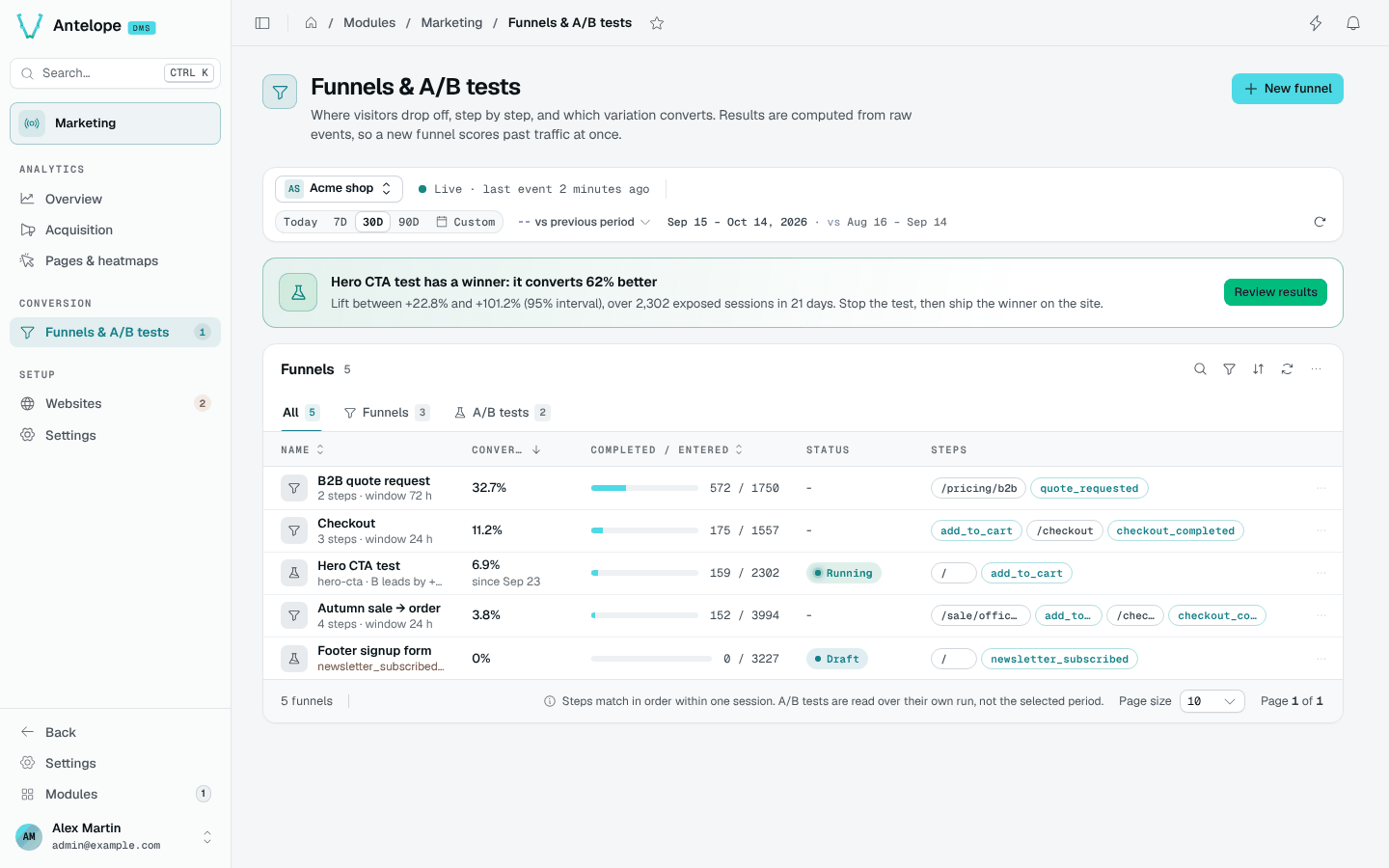
One row per funnel of the website picked in the context bar: its end-to-end conversion with its change against the comparison window (in points, plain funnels and draft splits), the sessions that completed out of those that entered as a bar, its status, and its steps as pills (pages outlined, events in the primary colour). Under the name: the steps and window, the A/B split's state and leader (by its own letter, only when it is ahead of the control), or a step the site never sent over the period, in amber. A click on the row opens the report; its menu edits, duplicates or deletes the funnel (the name must be typed, and a running test is said to stop). The tabs narrow the table to Funnels or A/B tests.
The banner above the table shows one thing: days of the period the raw events do not cover (funnels then count nothing for them), else a running test ready to decide (significant, its leader ahead, a full week served and 50 conversions in every arm), else a comparison window left out because the raw events do not cover it — rather than a +1,000 % change. The sidebar badge on the page counts the running A/B tests of the workspace.
A website without any funnel shows templates instead, built from its own
journeys over the period: its custom events triggered by the most sessions,
each led by the page those sessions viewed most often before it, with the
number of sessions that would enter it. One click opens the builder
prefilled with its steps (?steps=), or Start from scratch opens it empty.
Defining a funnel
New funnel in the page header opens the builder; Edit on a report
opens it on that funnel (?id=). Duplicate in the builder's header opens
a new funnel prefilled with a copy of it (?copy=<id>): the name becomes
Copy of …, the steps, window and arms are kept, and the experiment key is
left empty — keys are unique per site, and a new hypothesis is a new key.
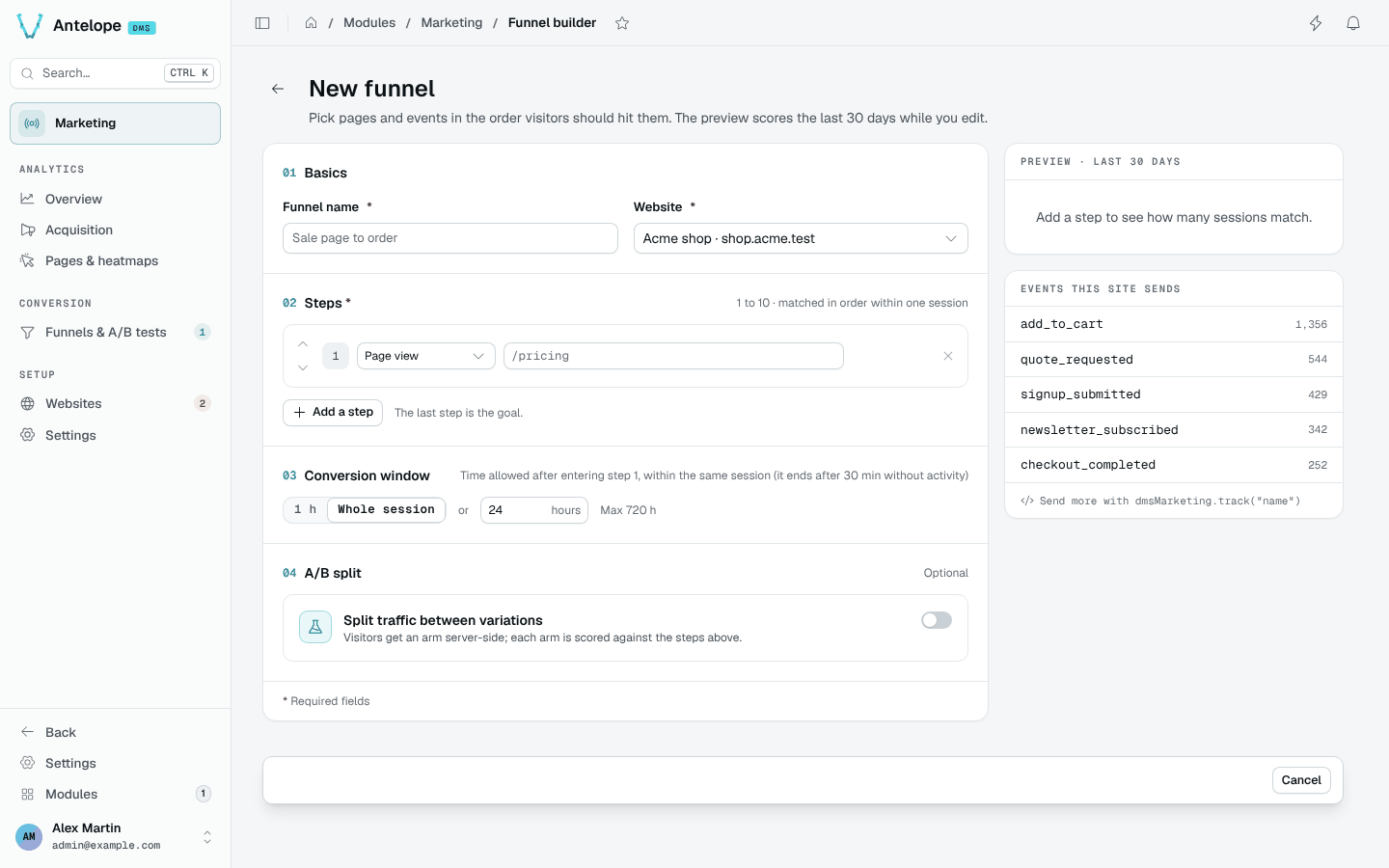
- Steps — 1 to 10, each either a page URL (a path the visitor must
view; a pasted URL, query string, fragment or trailing slash comes down to
the path, the case is ignored, and a final
*matches every path that starts with it, as in/blog/*) or a custom event (a name reported throughwindow.dmsMarketing.track(...)— see Tracker & custom events). The fields autocomplete from the site's tracked pages and custom events, with their views or triggers. A single step is a conversion counter on its own; the last step is the goal. - Conversion window — how long a session has to complete the journey after entering step 1: 1 h, Whole session (24 h) or any number of hours. Default 24 h, maximum 720 h. A funnel is matched within one session, and a session ends after 30 minutes without activity (by default): a window longer than the session changes nothing, which is why the builder no longer offers 7 or 30 days. Journeys across visits would need a per-visitor read — the visitor hash is salted per month, so such a read would also break at each month boundary.
- Website — a funnel belongs to one website. A plain funnel or a draft split can move to another website; a started split stays on its own.
- A/B split — off by default; see below.
While you edit, the preview scores the definition over the last 30 days
(POST /api/marketing/funnels/preview, nothing saved): sessions at each step,
the share of the previous step that reached it, and end to end. Invalid steps
answer 400, never a server error.
The builder follows the DMS form contract. Unsaved changes appear only once a value differs from what the page opened on (putting it back clears them); Discard restores it, and leaving with changes — Cancel, the back arrow, the sidebar, the browser's Back, a reload — asks first. Save checks the form before sending it and shows each problem under its field (name of 100 characters max, steps of 500, a window of 1–720 whole hours, keys and weights below); what the server refuses lands under its field too. Changing the steps or the window of a split that has started warns, then asks for a confirmation on save: every arm is re-scored over the whole test with the new goal.
Steps are matched in order within a session: a session counts for step N only if it already matched steps 1…N-1, earlier in time.
Reading a plain funnel
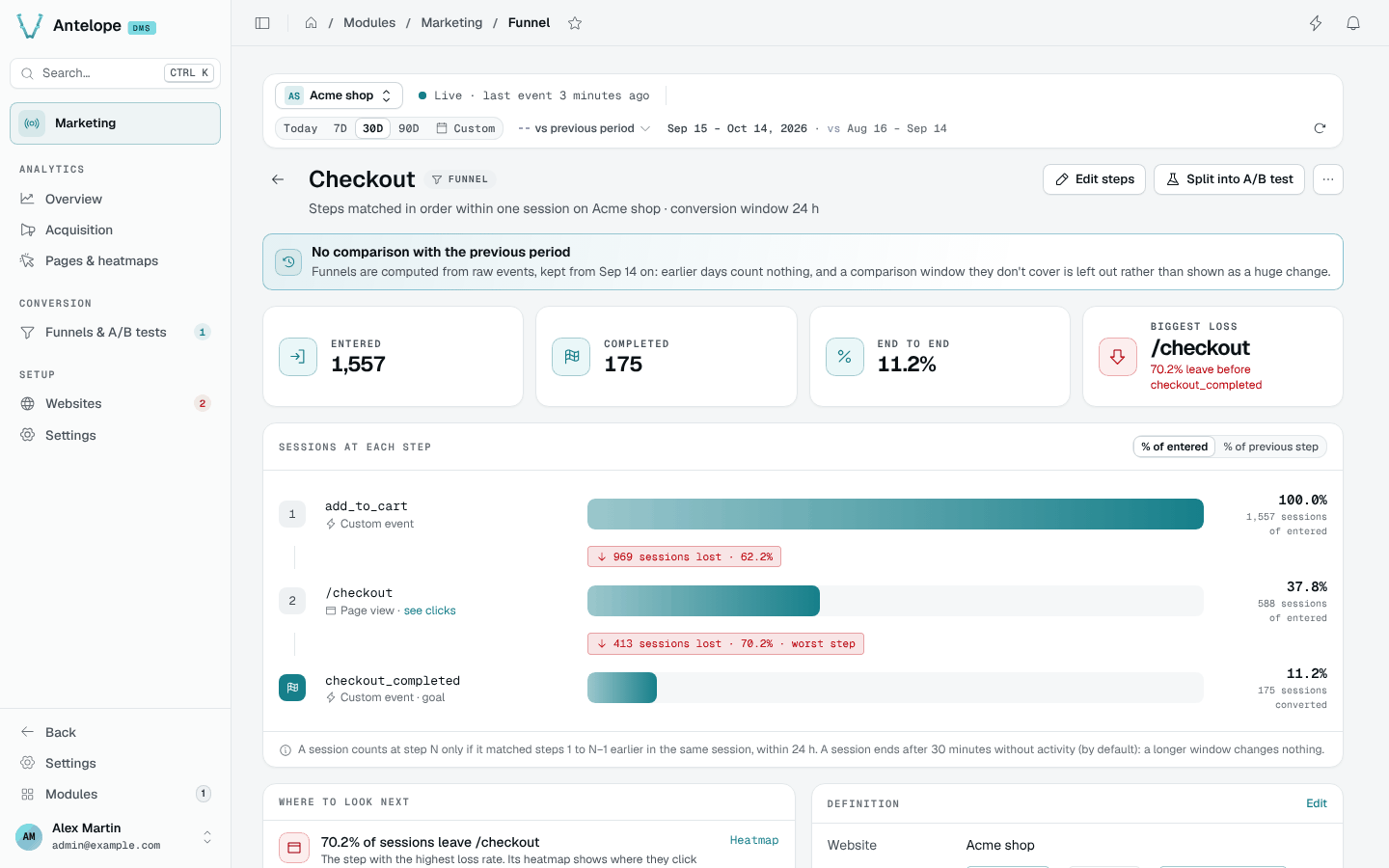
The report page opens on four figures: sessions entered, sessions completed and the end-to-end conversion, each with its change against the comparison window (end to end in points), and the biggest loss — the step with the highest loss rate. Below them, one bar per step carries the sessions that reached it, read as % of entered or % of previous step (a toggle), with the sessions lost before the next step; the biggest loss is flagged worst step. Where to look next names that step, with a link to its heatmap when it is a page, and the share of sessions that never reach step 2, with a link that opens the builder to split the funnel into an A/B test. Definition restates the steps, the window and the website.
Results are computed at read time over the raw events of the selected period
(bounded at MAX_FUNNEL_EVENTS = 200 000 events per computation, past which
a Window truncated warning says the numbers cover the oldest part of the
period only), so a new funnel definition immediately shows results for past
traffic — no waiting for data to accumulate. The flip side: the period
cannot reach past the raw events retention (90 days by default).
Splitting a funnel into A/B variations
Turn on Split traffic between variations in the builder (or Split
into A/B test on a report, which opens the builder with it on,
?split=1). The split is a key (the slug page code asks for:
lowercase letters, digits, - and _, starting with a letter or a digit,
64 characters max — variation keys follow the same rule) and 2–8
variations {key, weight} — weights are relative and normalized (0 or
more, at least one above 0), and
the builder shows each as its share of traffic; the first variation is the
control. The funnel's own steps are the goal every arm is scored against;
nothing else needs to exist anywhere. The builder also shows the
variation() snippet for the key, and a sample-size hint: how many entered
sessions detecting a +20% relative lift at the preview's conversion rate
would take (two-proportion test, 95% confidence, 80% power) — sized on the
arm with the smallest share of the traffic, so uneven weights take longer —
and how many months that is at the site's current traffic. The hint is hidden
once the split has started.
marketing_funnels ──► GET /api/marketing/experiments.js?website=<id>
   (split running)                  │  (public, per-visitor, no-store)
                                    ▼
                      await dmsMarketing.variation("hero-cta")
                                    │  page applies the arm
                                    ▼
                      `exposure` events through collect
                                    │
                                    ▼
                      A/B report: each arm step by step + z-test
The lifecycle is draft → running ⇄ stopped, driven by the Start test,
Stop test and Resume test buttons of the report page, each behind a
confirmation: Start lists what freezes (the key and the variations with
their shares) and reminds that the page must call variation(); Stop says
every visitor gets the control again. Nothing ever returns to
draft. Only running splits are served to visitors, and the key and
variations freeze once the split leaves draft: moving weights mid-run
would shift the deterministic buckets and silently reassign visitors. The
name, the steps and the window stay editable at any status — results are
computed read-time, so a step change re-scores past traffic immediately and
never touches assignment. The split itself can only be removed while it is a
draft; a stopped one keeps its results readable until the funnel is deleted,
which is allowed at any status — pages fall back to the control within the
definitions cache TTL (30 s).
Stopping ends the measurement, not just the assignment. From the stop on, the endpoint serves no assignment for the key — every visitor falls back to the control within the definitions TTL (30 s), pages already open at their next reload — collect refuses exposures for it, and the results are read over the runs that closed, so the numbers of a stopped split are final. The reverse holds at the other end: a draft has no results at all, only the plain funnel underneath it. Sessions exposed shortly before the stop keep the funnel's whole conversion window to reach the goal, and those late conversions still count.
Resuming picks up where the stop left off. The arms and their weights are frozen, so the same visitor lands on the same arm as before and the sessions already exposed stay in the counts: the split simply gains a second run, and the pause between the two counts for nothing — no assignment, no exposure. Resume when the stop was accidental or too early. Do not resume because the verdict was not the one you hoped for: stopping on a p-value and gathering more until it moves is optional stopping, and it inflates the false-positive rate well past the 95% the verdict claims. To test a changed hypothesis — other arms, other weights — create a new split instead.
While the split is a draft, the report still reads as the plain funnel — the baseline the arms will be compared to — under a Saved as a draft notice.
Client-site integration
One call, where the variation is applied:
window.dmsMarketing?.variation("hero-cta").then((arm) => {
  if (arm === "b") {
    showAlternateHero();
  }
});
Promise-based, so it runs as is in a classic <script> (a top-level
await only works in a module script); the builder's snippet has this shape.
- Assignment is server-side and deterministic —
sha256(visitorId : experiment key)against the normalized weights. The same visitor keeps the same arm for the whole month (the identity salt rotates monthly, see Architecture); nothing is stored on the visitor's device. nullmeans render the control — key unknown or not running, collection disabled, DNT. Treat every non-matching answer as the control and the page degrades safely.- The exposure is reported by the call itself, once per page load, and only for the keys the page consulted: a split fetched but never asked for does not count anyone as exposed.
- Browser-side only. The assignment derives from the visitor's own
request (IP + user agent). Fetching it at SSR time would put every
visitor behind the renderer's single identity — one arm for everyone. If
you must assign server-side, run your own split and report it with
dmsMarketing.exposure(experiment, variation)— which the backend accepts only while the split is running, exactly like the assignment it replaces.
Reading the results
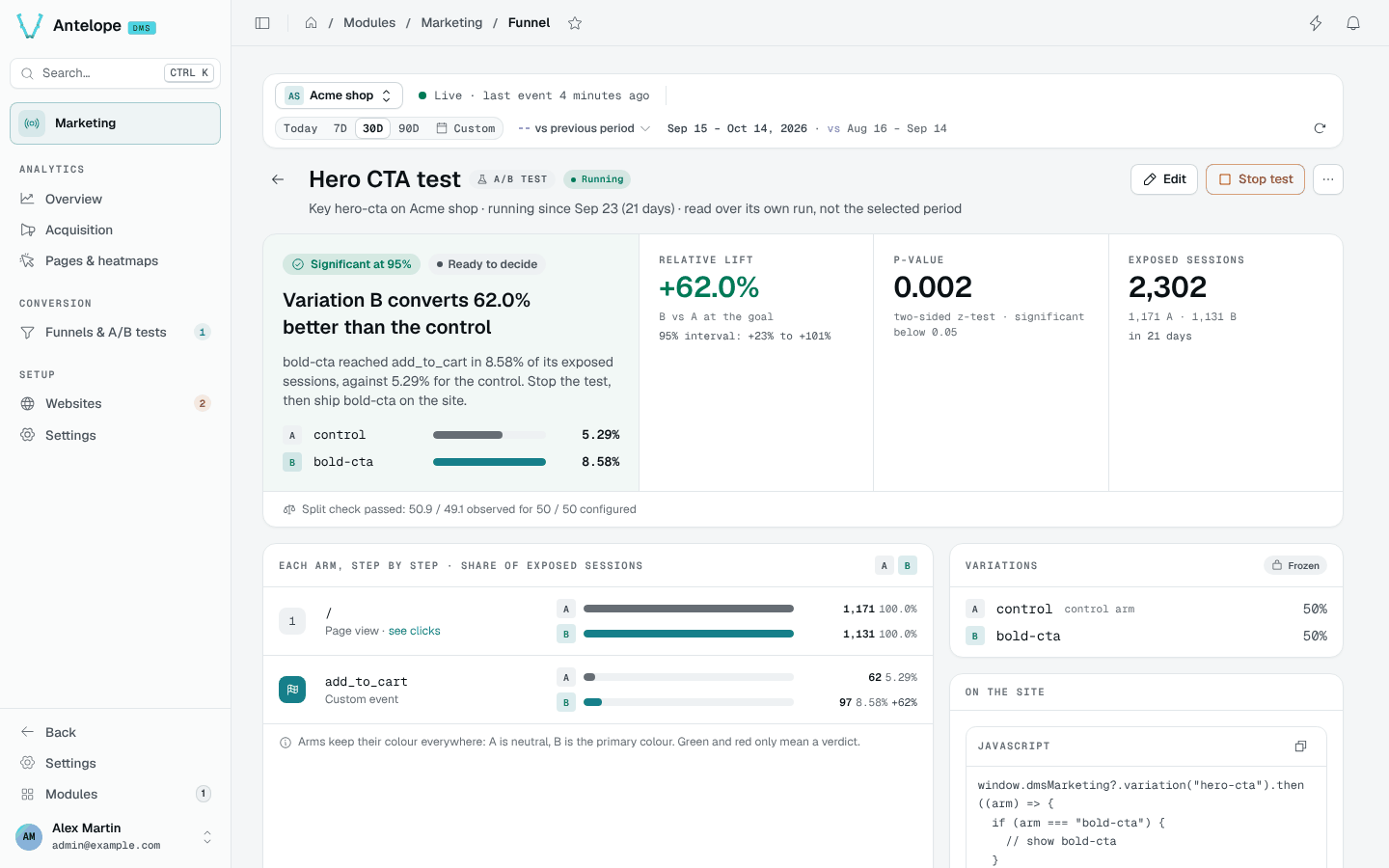
Open the funnel's report — once its split has started, the report is the A/B test's. Results are read against the funnel's own steps, nothing else to pick. The computation is read-time over the raw event window, so editing the steps immediately re-scores past traffic.
The window is the split's own runs, not the period of the context bar: the line under the title says which (running since 12 Aug (20 days), ran 12 Aug – 30 Aug). An A/B reading is the whole sample gathered since the start — cutting it to the last 7 days would answer a different question, and a stopped split would keep changing as the period slides past it. The period still drives every other page, and the plain funnel of a split still in draft.
The report opens on the verdict, as a sentence with its next action — Variation B converts 12% better than the control … Stop the test, then ship b on the site — and beside it the relative lift of the best-converting challenger at the goal with its 95% interval (+23% to +101%), the p-value of a two-sided z-test (significant below 0.05) and the exposed sessions with the days served. Past one challenger the verdict judges only the best arm, and each challenger is tested at 0.05 divided by the number of challengers (Bonferroni): three arms are significant at 97.5%. Every arm keeps its own figures below.
A significant reading only reads Ready to decide once the split has
served a full week and every arm has 50 conversions; before that it is Too
early to call — checked every day, a p-value crosses 0.05 by chance long
before the test has its sample. The banner of the list follows the same rule.
A stopped test says what to do on the site (ship the winner, remove the
variation() call); a running one nobody was exposed to says to check the
call instead of showing 0% rates.
Then each arm, step by step, so the arms compare at every step of the way and not only at the goal. Every figure is a share of that arm's exposed sessions, not of funnel entries (entering the funnel is itself an outcome the variation influences). Arms keep an identity colour everywhere — A neutral, B the primary colour, then other tones — and green and red only ever mean a verdict. The report closes on the frozen variations and their weights, and the snippet the page calls.
The verdict is withheld — never guessed — when the sample is too thin, the split check failed or the event window was truncated. When no challenger reaches a verdict on a healthy window, the rates are withheld with it: a Too few conversions to compare the arms card gives raw counts (exposed, reached the goal) per arm instead, until every arm has at least 5 conversions.
Two warnings can appear above the numbers; a passing split check also shows as one line (Split check passed):
- Sample ratio mismatch (SRM) — the observed split across arms is too far from the configured weights (chi-square, p < 0.001). Assignment or exposure reporting is broken somewhere; distrust the numbers.
- Window truncated — the raw-event window hit its cap
(
MAX_FUNNEL_EVENTS); numbers cover the oldest part of the period only.
What to know before trusting a reading
- The unit is the session. A visitor exposed in one session and converting in the next without re-exposure does not count. Sessions exposed to two arms of the same split (salt rotation mid-session) are excluded entirely.
- Results live as long as raw events. Exposures and conversions share the raw-event retention; past it, both sides of the ratio fade together — including the final reading of a stopped split, which is why a finished test worth keeping is worth exporting.
- One month is the natural horizon. On the 1st the identity salt rotates and visitors re-draw their arm; the per-session unit keeps the statistics valid, but a months-long split mixes populations.
- Multiple challengers use a correction. Each challenger is tested at
0.05 / number of challengers(Bonferroni). With one control and two challengers, each comparison uses 0.025. This does not correct for repeatedly checking the result and stopping as soon as it becomes significant.
Deleting a funnel
Delete funnel… on the report page asks for the funnel's name. The definition goes, its A/B split with it; the collected events stay. Pages asking for a deleted split's key fall back to the control within the definitions cache TTL (30 s).