Translation
Overview
See how complete each language of a workspace is and where the gaps are.
The Overview answers one question: how translated is this workspace? Open it from Translate › Overview.
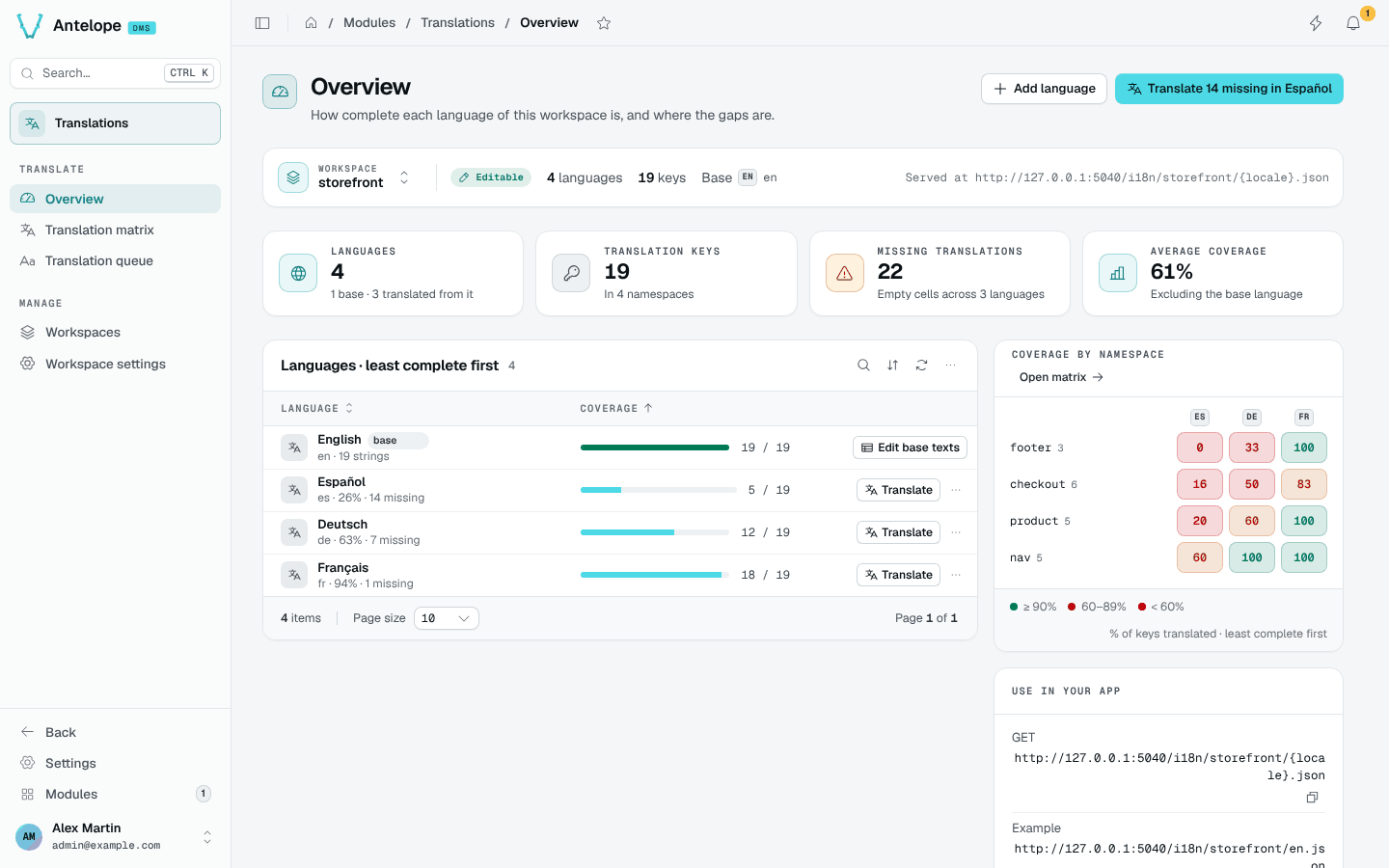
What the page shows
- Scope bar: the current workspace, whether it is editable, its language and key counts, its base language and, for a workspace you created, its public URL. Use the switcher to change workspace on any page.
- KPIs: languages, translation keys, missing translations (empty cells across the non-base languages) and the average coverage, base language excluded.
- Languages, least complete first: one row per language with a coverage bar. Translate opens the translation queue of that language; Edit base texts opens the base language. The row menu makes a language the base or removes it.
- Coverage by namespace: a heatmap of the percentage of keys translated, per namespace (the first segment of a key,
checkoutincheckout.total) and per language. Green is 90% and above, amber 60 to 89%, red below 60%. - Use in your app: where the keys live and how they load. For a workspace you created, it gives the public
GETURL and an example.
Header actions
Add language opens the language picker. When a language has gaps, the primary action jumps straight to the queue of the least complete one, for example Translate 14 missing in Español.
Share a link to the page: the
?workspace= query keeps the workspace you were looking at.