Settings
Set the AI agent, its thinking and approvals, the Builder's Safe mode and undo history, and see token usage.
The Settings page (/modules/ai/settings) is the first page of the Assistant module. It holds the defaults of new conversations. Each change saves as soon as you make it.
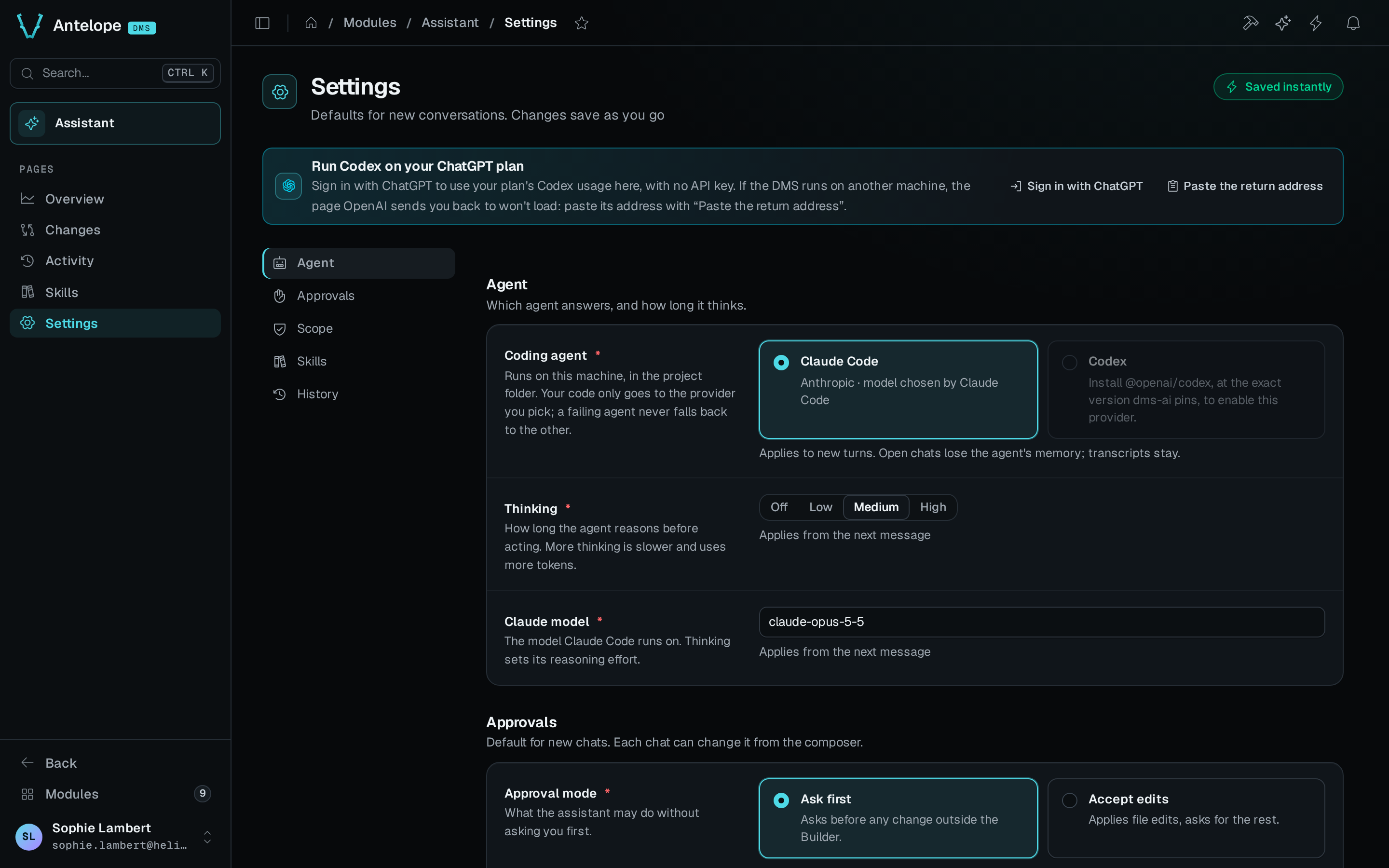
Settings
| Section | Setting | Options |
|---|---|---|
| AI | Coding agent | Claude Code (default) or Codex. Applies to new turns. Open chats lose the agent's memory, and their transcripts stay. When Codex is not set up on this machine, its option is disabled and says why. |
| AI | Claude model | The model Claude Code runs on, claude-opus-5-5 by default. Thinking sets the effort (Low, Medium or High), and Off disables thinking. Applies from the next message. |
| AI | Thinking | Off, Low, Medium (default) or High. Applies from the next message. |
| AI | Default mode on Claude Code | Auto review (default), Ask first, Accept edits or Plan only. Ask first asks before every command, read-only ones included, and before any change outside the Builder. Accept edits applies file edits unasked, except edits of dependency files, git hook files and project configuration files, and asks before every command. Auto review lets a safety check approve routine file edits and web access and block risky ones. Shell commands, scheduled tasks, edits of dependency files, git hook files and project configuration files, and any tool it does not know still ask. Where the model, the plan or a setting does not allow it, the chat asks first and says so in a notice. |
| AI | Default mode on Codex | Ask first (default), Accept edits or Plan only. Codex has no Auto review. With Codex, Accept edits works as Ask first: it asks before every file edit and before any command that writes. |
| AI | Unanswered requests | Deny after 5 (default), 15 or 30 minutes. Notify me in the DMS (on by default) shows a toast when a request arrives while the panel is closed. |
| AI | Use machine-local skills | Off by default. Adds the skills in ~/.claude/skills on this machine. |
| Builder | Safe mode | On by default. Safe mode changes pages, tables and queries through the Builder only. Off, the assistant works in Code mode, which can also edit any project file and run commands. Without the Builder, the switch is disabled and says so. The section applies in development only. |
| Builder | Always ask for | Deleting pages, tables, fields or queries is locked on. The DMS MCP server holds these calls, and the chat asks you on a card before the agent's repeat of one runs. Mapping a database again when it would remove a page, and changing antelope.config.ts, ask the same way. Adding or removing dependencies and Removing or moving Builder blocks ask while they are on. These ask in every mode, Auto review included. Edits of git hook files (anything inside a .git directory, .husky/*, lefthook and pre-commit config) always ask and ignore the dependencies toggle, and so do edits of antelope.config.ts, an antelope.*.json file or a file under .antelope/. |
| Builder | Undo history | Keep 7 days, Keep 30 days (default) or Keep 90 days. Older change sets can no longer be undone. |
The default mode is stored for each agent, so switching agent switches the default with it. A mode saved for the other agent is kept.
Each chat can change its approval mode and its scope, Safe mode or Code mode, from the composer.
Status banner
A banner at the top of the page appears when the assistant needs you. It shows the most pressing of these states:
- The assistant is offline, with a Restart assistant button. When the module's configuration turns the sidecar off, the banner says so and has no button.
- The assistant's last turn failed, with the error and an Open activity button.
- A count of requests waiting for you, such as 2 requests are waiting for you.
Account banner
A banner under it shows the ChatGPT account that Codex runs on. The banner appears only while the sidecar runs.
- Signed out, the banner reads Run Codex on your ChatGPT plan. Sign in with ChatGPT opens OpenAI's consent page in a new tab. OpenAI then sends you back to an address that starts with
http://127.0.0.1. On the machine that runs the DMS, the sign-in completes by itself. - When the DMS runs on another machine, that return page does not load. Copy its whole address, click Paste the return address, paste it into Return address, then click Finish signing in. The address works once, within 10 minutes.
- Signed in, the banner reads Codex runs on the ChatGPT plan of and your email. Sign out asks for confirmation, then revokes the session. Codex stops working on every DMS project of this machine until you sign in again.
Usage
The Usage section counts the tokens that the conversations used over the last 14 days. Tokens · last 14 days charts them per day. Last 14 days gives the total tokens, the number of conversations and the biggest conversation. Your provider bills the tokens. With Codex signed in with ChatGPT, they count toward your plan's limits.