Activity
Audit every tool call the assistant made, who allowed it and what came out, and export it.
The Activity page (/modules/ai/activity) is the audit log of every tool the assistant used.
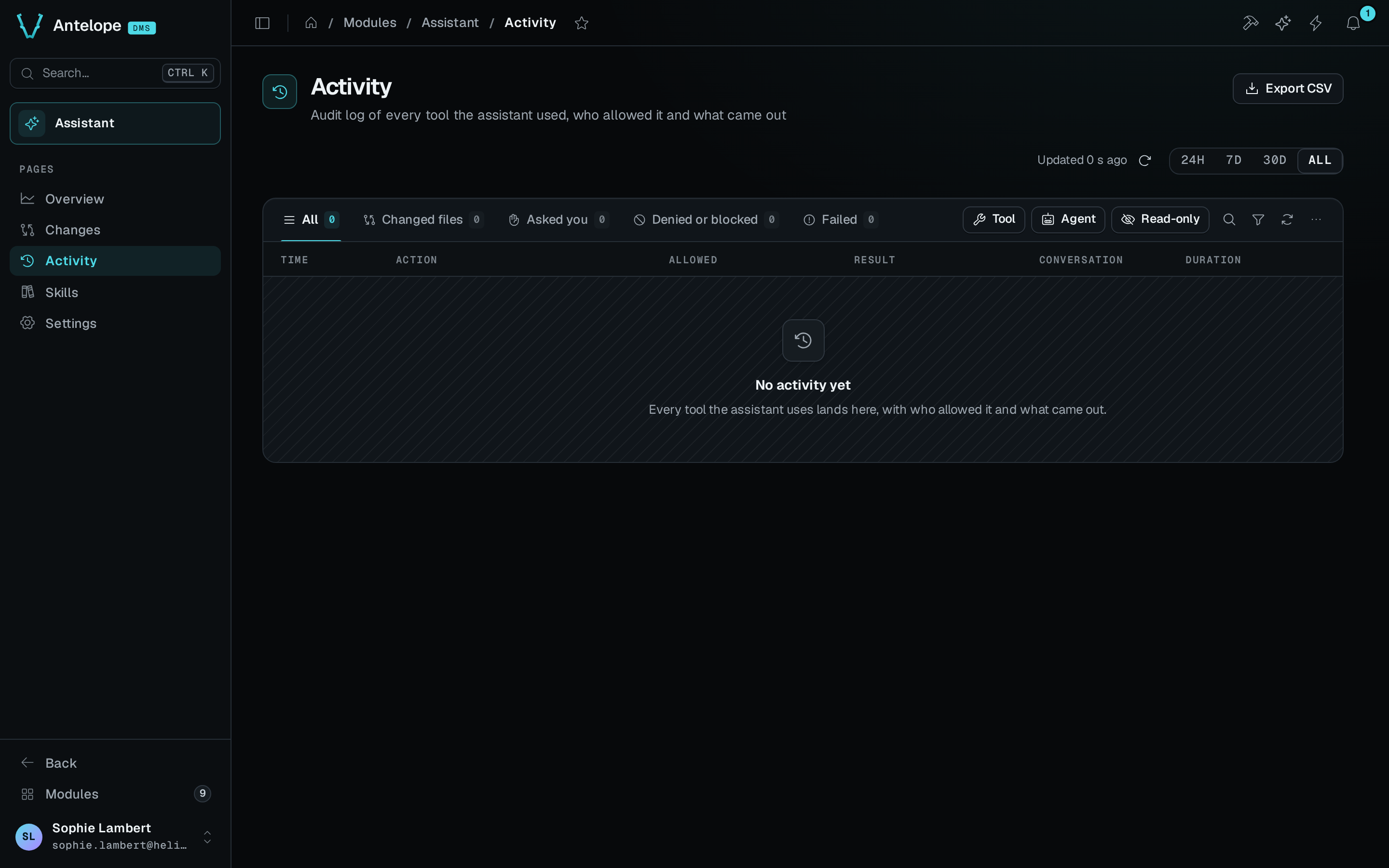
The log
- The toolbar at the top says when the log was last read and has a refresh button. Then comes the period the log covers: 24H, 7D, 30D or ALL. ALL, the whole log, is the default.
- The tabs are All, Changed files, Asked you, Denied or blocked, Failed and Held by the DMS.
- The quick filters are Tool, Agent and Read-only, which hides the read-only calls.
- The search, Search tools, files, pages, matches the tool, its target and the conversation title.
- The columns are Time, Action (the tool and its target), Allowed, Result, Conversation and Duration. A deletion's target shows in red.
- The page loads 25 rows at a time, and Load more adds the next 25.
- Export CSV, in the page header, downloads the log as a CSV file of up to 10,000 rows, whatever the period, tab or filter.
Allowed takes one of these values: Read-only, automatic, Builder, automatic, Approved by you, Allowed by a rule, Allowed by Auto review, Blocked by Auto review, Blocked · safe mode, Denied by you or Expired.
Result takes one of these values: Done, Pending, Failed, Not run, Blocked, Stopped, Expired or Held by the DMS.
A call the DMS MCP server held until you confirm it changed nothing, so the log leaves it out and lists its repeat, the call that asked you. When you approved a call on a card and the DMS then held it, the log keeps your approval: the call reads Held by the DMS and sits under the Held by the DMS tab, not under Denied or blocked, and the counts on the Overview leave it out.
When the sidecar is not running, the log says Can't reach the assistant. An empty log says No activity yet.
Action detail
A click on a row opens its detail in a panel on the right, and ?record=<id> links to it. The panel shows the row's position, such as 3 / 25, and J and K step to the next and previous row.
The detail starts with the tool's group (Builder, Code, Web, Project or Assistant) and the time, then the action and its target, such as Delete page · /orders. Below that, it shows:
- Allowed and Result, as in the log. A finished call that made a change set reads Applied with the set's number, such as Applied · #3.
- Arguments, the arguments of the call, one per row.
- Decision trail, each step with its time. The trail starts at Requested. A request you were asked about adds Asked you and the decision, such as Allowed by you with your name. Otherwise, the trail gives the automatic decision, such as Allowed automatically (Builder). It ends on Done, Failed or Stopped.
- Diff produced, the diff of an edit.
- Output, the tool's output.
- Show raw JSON, which shows the whole record.
Open conversation opens the chat the call came from. View change set #3 opens the change set the call belongs to.