Introduction
@antelopejs/dms-frontend runs the browser-facing part of your DMS project. Start your backend, run ajs dms dev, and open the URL it prints to use the dashboard.
Run your dashboard
In an existing DMS project with the CLI installed, keep these two commands running in separate terminals:
pnpm exec ajs project dev -w
pnpm exec ajs dms dev
The frontend discovers the local backend and prepares the application. Open its Local URL: a fresh database opens onboarding; an existing project opens its sign-in flow or dashboard. No frontend module code is needed for this first run.
If you are adding behavior to a dashboard that already runs, start with Anatomy of a frontend module. For deployment, follow Production.
What the package provides
The package connects the backend's frontend modules to one application:
- The
ajs dmsCLI. It asks the backend which frontend modules it loads, materializes them into a generated workspace, builds it, and runs the frontend server:dev,build,start,prepare,workspaces,cleanandverify-source. - The Vue renderer. The workspace it generates is a Vue 3 application served by a Node server, with Vite, Inertia and server-side rendering.
vueis the only renderer the package ships today. - The frontend-module SDK. A module registers its pages, components and plugins in
dms.frontend.ts, its server routes indms.server.tsand its build-time declarations indms.frontend.build.ts, through the#dms/frontend-module,#dms/serverand#dms/frontend-buildaliases.
How it fits together
The browser only ever talks to the frontend server. The frontend server renders each page from what the backend says the page holds, answers the routes its modules declare, and forwards the backend prefixes the modules declare, adding the session's access token on the way. The token never reaches the browser, which only holds a sealed, HttpOnly session cookie.
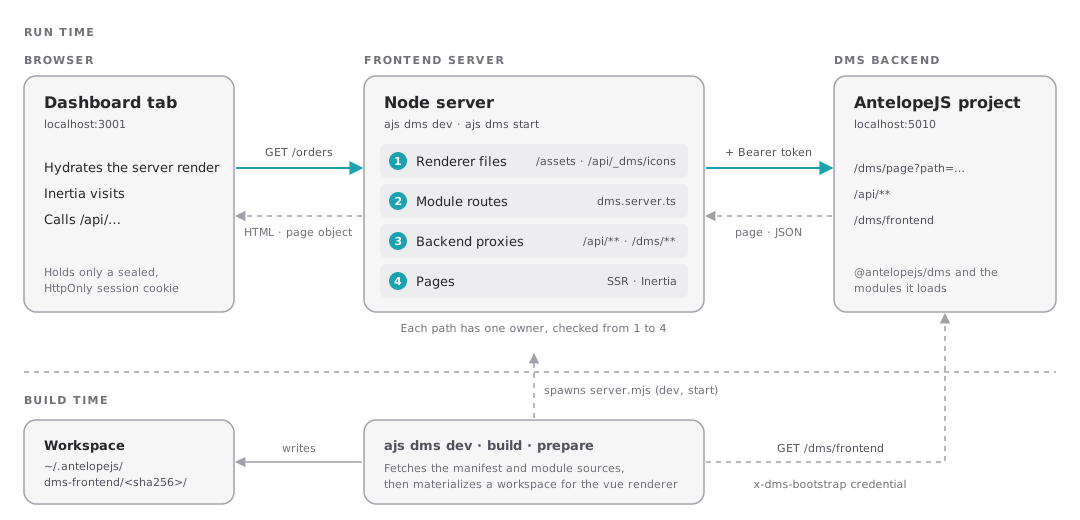
At build time, ajs dms fetches the frontend manifest from GET /dms/frontend?renderer=vue&rendererVersion=3, presenting the backend's bootstrap credential in the x-dms-bootstrap header. The manifest lists every frontend module with its options; dev and prepare then read each module in place, from the backend's own directories, while build downloads them as one archive. Everything lands in a workspace under ~/.antelopejs/dms-frontend/, one per backend.
Run it
ajs dms dev finds the backend of the project you are in and serves the dashboard with hot reload.
Compatibility
The DMS declares the renderer releases its frontend runs on in engines["@antelopejs/dms-frontend"] of its frontend module's package.json, and the CLI refuses to build a module whose range excludes it (see Supported releases). The table lists those ranges, as published on npm.
@antelopejs/dms | @antelopejs/dms-frontend | Renderer generation |
|---|---|---|
| 0.9.1 | >=0.6.1 <0.7.0 | 0.6: server rendering without built-in routes, explicit backend proxy |
| 0.9.0 | >=0.6.0 <0.7.0 | 0.6 |
| 0.8.0 – 0.8.3 | >=0.5.2 <0.6.0 | 0.5: component prefixes |
| 0.7.2 – 0.7.21 | >=0.5.2 <0.6.0 | 0.5 |
| 0.7.0 – 0.7.1 | >=0.5.1 <0.6.0 | 0.5 |
| 0.6.0 – 0.6.2 | >=0.5.0 <0.6.0 | 0.5 |
| 0.5.0 – 0.5.6 | >=0.3.1 <0.4.0 | 0.3 |
@antelopejs/dms-frontend 0.4. While the package is below 1.0, every minor release can break modules, so a module caps its range below the next minor.The current @antelopejs/dms-frontend 0.6.3 package needs Node.js 20.12 or later and @antelopejs/core 1.16.0 or later, below 2.0. The core's ajs command delegates ajs dms to this package. The historical compatibility rows above describe the listed DMS releases, not every later patch release; check your installed DMS frontend module's engines range when upgrading.
Renderers
A renderer is the framework a generated workspace is built for. The loader negotiates it with the backend: it asks for renderer=vue&rendererVersion=3 and refuses a manifest that lists a module for any other renderer. Every file of the workspace comes from templates/vue/ in this package, and templates/vue/server.mjs with templates/vue/server/ becomes the Node server ajs dms start runs.
Renderers for other frameworks are a direction, not a promise: there is no --renderer flag and no renderer registry. The dms.frontend.ts entry and the #dms/frontend-module alias belong to the Vue renderer, not to the loader.
Where to go next
- Installation adds the CLI to a project and runs it for the first time.
- Rendering model follows a request from the browser to the backend and back.
- The Frontend layer page of the DMS guide covers the dashboard side: layers, the core frontend module and its composables.