Anatomy
A frontend module adds Vue components, pages or server routes to a DMS dashboard. Keep its source in your backend module, usually in frontend-vue/; do not edit the generated workspace under ~/.antelopejs/dms-frontend/, because the CLI replaces those copies.
Start with an existing backend module in a running DMS project. Register its frontend directory as shown below, then add only the entry you need. For a small end-to-end example with a response you can check using curl, follow Return your first response.
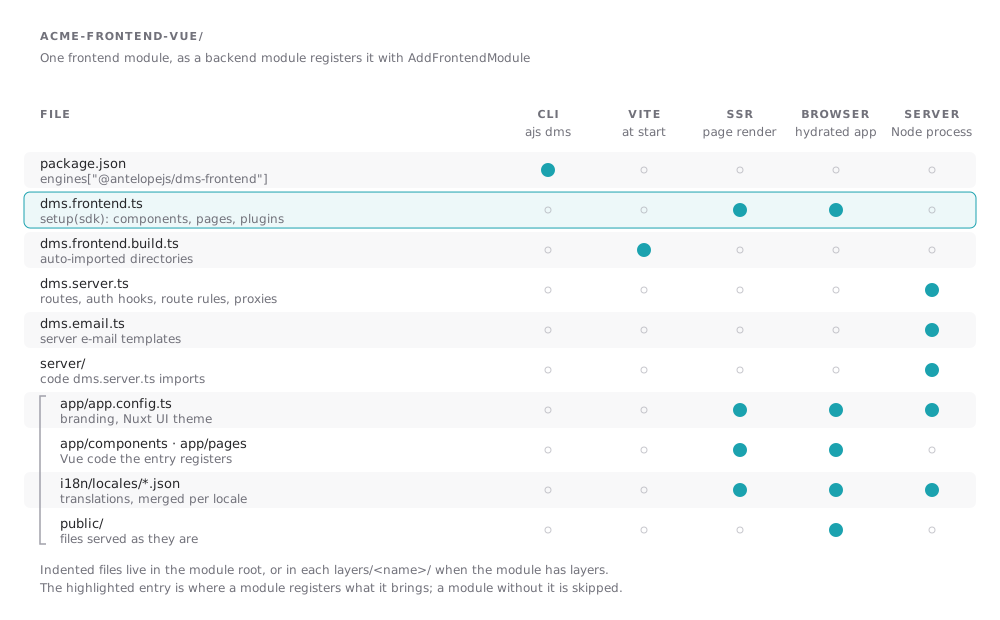
The backend side registers the module and the renderer it targets:
await AddFrontendModule({
  name: "@acme/dms-billing-frontend-vue",
  sourcePath: path.join(__dirname, "../frontend-vue"),
  renderer: { name: "vue", version: "3" },
});
The registration also carries what the frontend server needs to know about the backend: publicEndpoints, backendProxies and authEstablishEndpoints, covered in Deployment. The Distributable module page of the DMS guide covers the backend half.
Layers
A module keeps its application code, translations, public files and app config either at its root or in layers, one directory each under layers/<name>/. Every layer answers to the #<name> alias inside the workspace, which is how the DMS core module exposes #dms-core and #dms-ui. Where two layers of a module hold the same file, the last one by name wins.
The entry: dms.frontend.ts
A module opts into the Vue renderer with a root dms.frontend.ts whose default export receives the SDK. It imports the SDK's types from the #dms/frontend-module alias, which the loader resolves to the generated frontend-module.ts.
import MyBlock from "./components/MyBlock.vue";
import ReportsPage from "./pages/ReportsPage.vue";
import type { DmsFrontendModule } from "#dms/frontend-module";

const frontendModule: DmsFrontendModule = {
  setup(sdk) {
    sdk.registerComponent("MyBlock", MyBlock);
    sdk.registerPage("reports", ReportsPage);
  },
};

export default frontendModule;
This example assumes components/MyBlock.vue and pages/ReportsPage.vue already exist. registerComponent makes a component available by name; it does not place it on a page. Likewise, registerPage("reports", ...) selects a renderer for a matching backend page; it does not create a /reports backend route or menu entry. Create the page in the DMS first, then visit it to see the registered renderer.
The SDK setup receives registers everything the module brings:
| Method | Registers |
|---|---|
registerComponent(name, component, options?) | A component every template and backend page tree can name. See Components. |
registerPage(name, component, preload?) | A page, matched against the page's component name, its route's fullSlug, then its request path, without leading or trailing slashes |
registerDynamicPage(name, component, preload?) | The page that renders a route no registered page matches: the one named [...slug], else the one named default |
registerLayout(name, component, preload?) | A layout pages render in |
registerErrorPage(component, preload?) | The error page |
registerPlugin(setup, options?) | A plugin that runs when the application starts, on the server and in the browser, or only in the browser with { clientOnly: true } |
registerMiddleware(name, handler, options?) | A navigation middleware; { global: true } runs it on every navigation, { parallel: true } starts it together with its parallel neighbours |
registerAccessRedirect(code, path) | Where a page visit refused with a typed 403 goes. See below. |
provide(key, value) | A value for Vue's inject |
use(plugin) | A Vue plugin |
sdk.options holds the module's public options from the manifest. A component the page tree names but no module registers falls back to the generic card renderer.
Order and idempotency
Entries run by descending manifest priority, then by module id. Within one setup, the first module to register a name keeps it. A module without dms.frontend.ts is skipped by the generated loader.
Plugins registered with registerPlugin(setup, { enforce: "pre" }) run before the default plugins, regardless of their module's priority. Plugins with { enforce: "post" } run after them. Each group keeps the modules' priority order. Use pre for a plugin that establishes context, such as the async data scope, before other plugins read data.
ajs dms dev sets every module up again, into empty registries, each time a change to a layer reaches the server renderer. A setup can therefore run more than once in one process: it registers, and keeps no state of its own between runs.
Redirecting typed access refusals
A backend can refuse a whole surface with a typed 403 whose body is a machine-readable code, such as a tenant gate blocking a suspended workspace. A module that owns such a code registers where a refused page visit goes instead of the error page:
sdk.registerAccessRedirect(
  "saas.errors.workspace.access_blocked",
  "/workspace-suspended",
);
The server answers the refused visit, document or Inertia, with a redirect before anything renders, so a reload lands there directly. The body may be the bare code or JSON ("code" or { "message": "code" }). A destination refused in turn shows the error page instead of looping. The first registration of a code wins, in manifest-priority order.
The other entries
| File | Runs | Page |
|---|---|---|
dms.frontend.build.ts | In Node.js, when Vite starts | Auto-imports |
dms.server.ts | In the frontend server | Server routes |
dms.email.ts | In the frontend server's e-mail renderer | E-mails |
app/app.config.ts | In the browser, the server render and the e-mail renderer | App config |
package.json | Read by the CLI before it builds anything | Supported releases |
Configuration
How the CLI loads .env files, the secrets it needs and where they come from, and every environment variable the CLI and the frontend server read.
App config
How every layer's app/app.config.ts is merged before the modules set up, in which order, and how dev applies an edit without a reload.