Rendering model
The generated application is an Inertia application that the frontend server renders. It owns page resolution, server-side rendering, hydration and the root Vue tree; every frontend module owns its dms.frontend.ts entry and registers into it. The same generated registry of frontend modules drives the server and the browser entries.
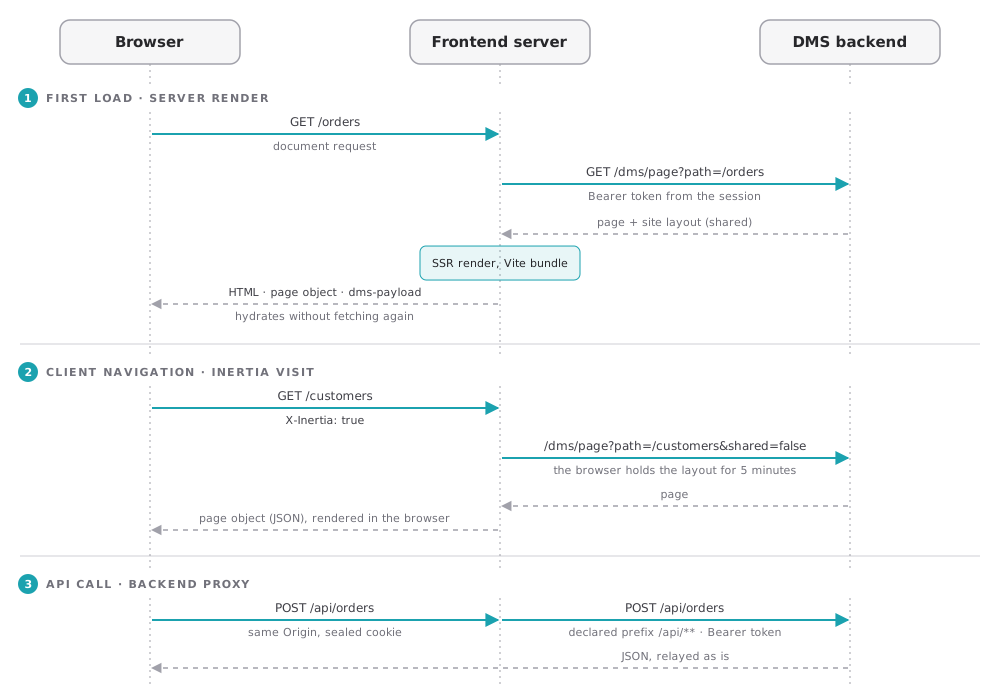
First load: a server render
A full-page request reaches the frontend server, which resolves its owner. For a page, the server asks the backend for it at /dms/page?path=…, with the access token of the session, renders it through the Vite SSR bundle, and answers with:
- the HTML of the page;
- the Inertia page object the browser hydrates with: the page (its route and layout), the session (
user,session) and the site layout (shared); - one
<script id="dms-payload" type="application/json">holding the data the page's components loaded, their failures and the state they chose to transfer, so the browser hydrates without loading it again. See Data loading.
A route rule can turn the server render off for a page with ssr: false: its document requests then get the client-rendered shell. See Route rules.
Navigation: Inertia visits
Once the page is hydrated, following a link is an X-Inertia visit. The server answers with a page object in JSON, and the browser renders it. The site layout is an Inertia once prop: while the browser holds a copy less than five minutes old, the server asks the backend for the page alone, with shared=false. See Navigation.
API calls: the backend proxy
The browser calls the backend through the frontend server, on the prefixes the modules declare, such as /api/** and /dms/**. The server adds the session's access token to the forwarded request, so the token never reaches the browser. See Routing and the backend proxy.
Browser-only work
Client-only plugins, registered with { clientOnly: true }, and the DmsClientOnly component defer browser-only work until the application runs in the browser. Everything else runs on both sides, so a component's setup must not touch browser globals unguarded.
Favicons
A page whose render declares no icon through useHead gets an empty <link rel="icon" href="data:,">, which keeps the browser from asking for /favicon.ico. A page that declares its icons, one per color scheme for instance, gets only those.
Hot reload in development
Under ajs dms dev, edits to translations, app configs and public files reach the open page without a reload, and an edited component is used by the next server render without a restart. The dev command lists what each kind of edit does.