Workspaces and cache
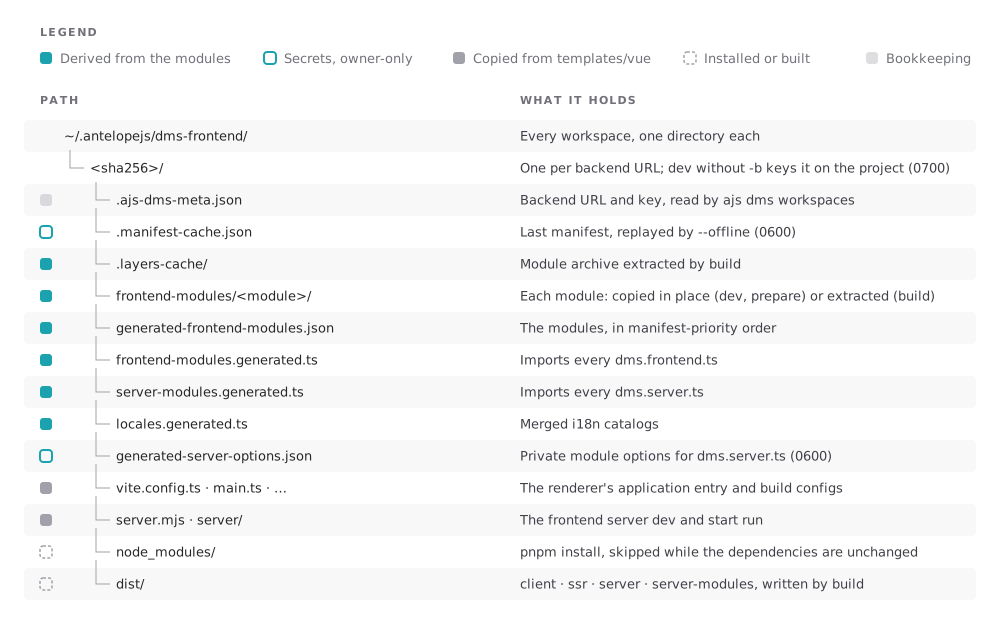
Every command that generates something writes it into a workspace: an owner-only directory under ~/.antelopejs/dms-frontend/<sha256>/ that holds the materialized modules, the generated files, the installed dependencies, the manifest cache and the build output.
One workspace per backend
Each canonical backend URL gets its own workspace. build, start, prepare, clean -b and dev -b all key on that URL, so one backend means one workspace shared by every command. Equivalent spellings map to the same key: the scheme and host are lowercased, localhost and [::1] become 127.0.0.1, default ports and a bare trailing slash are dropped.
dev without -b is the deliberate exception. It discovers the backend from the enclosing project's .antelope/dev.json and keys its workspace on the project directory, because a development backend can land on another port between runs, and re-keying on the URL would discard node_modules, the manifest cache and the browser's storage scope every time.
ajs dms dev followed by ajs dms build -b <url> against the same backend creates two workspaces, a few hundred megabytes each. Pass -b to dev to share a single one. ajs dms workspaces lists both, and ajs dms clean -b <url> only reaches the URL-keyed one.The workspace's full SHA-256 also scopes what the dashboard keeps in the browser, such as local storage, cookies and persisted state, so two backends served from the same origin never share it.
Permissions
The workspace directory is 0700. The manifest cache, .manifest-cache.json, stores the backend's answer verbatim, private module options included, and generated-server-options.json holds the private options dms.server.ts reads: both are 0600, written through a temporary file so a world-readable copy never exists, even for a workspace created before this hardening.
The manifest cache
Each successful run caches the manifest, and build the extracted module archive, in the workspace.
| Command | Backend unreachable or failing | With --offline |
|---|---|---|
dev | Uses the cache, with a warning | Uses the cache |
prepare | Uses the cache, with a warning; skips when there is none | Uses the cache; skips when there is none |
build | Exits 1, saying whether a cache exists and how old it is | Builds from the cached manifest and archive, with a warning |
An authorization failure never falls back to the cache: it can hold private options from an earlier authorized run, and replaying them would defeat the credential.
Dependencies
The workspace installs its dependencies with pnpm, once, and again only when a module's dependencies change. --force reinstalls them; for build, it also extracts the module archive from scratch. A module's own lifecycle scripts (preinstall, postinstall, prepare and the like) are stripped from its copy, so installing the workspace never runs them.
Production
Build and serve the dashboard for real traffic, with the secrets it needs, behind a TLS reverse proxy, and how to scale it out.
Routing and the backend proxy
The order in which the frontend server picks the owner of a path, how modules declare backend prefixes, and what the proxy adds and relays.